
1. Start from a goal
Open Datasets. Type the goal in What would you like to train? and attach source files or an existing dataset. Sending creates the dataset when you attached files; the assistant starts when the source has landed. On a dataset page, message the assistant in the dock. Each dataset has one conversation, shared by the project’s members. A teammate’s message shows their email.2. Follow the work
The assistant explores the data with Python in an isolated workspace and reports measured results as text, tables, charts and dataset versions. Each step shows one line that says what it does; open a step to read its code. To change data it writes a pipeline package and runs it on the platform, which publishes the result as new versions, as in Prepare data.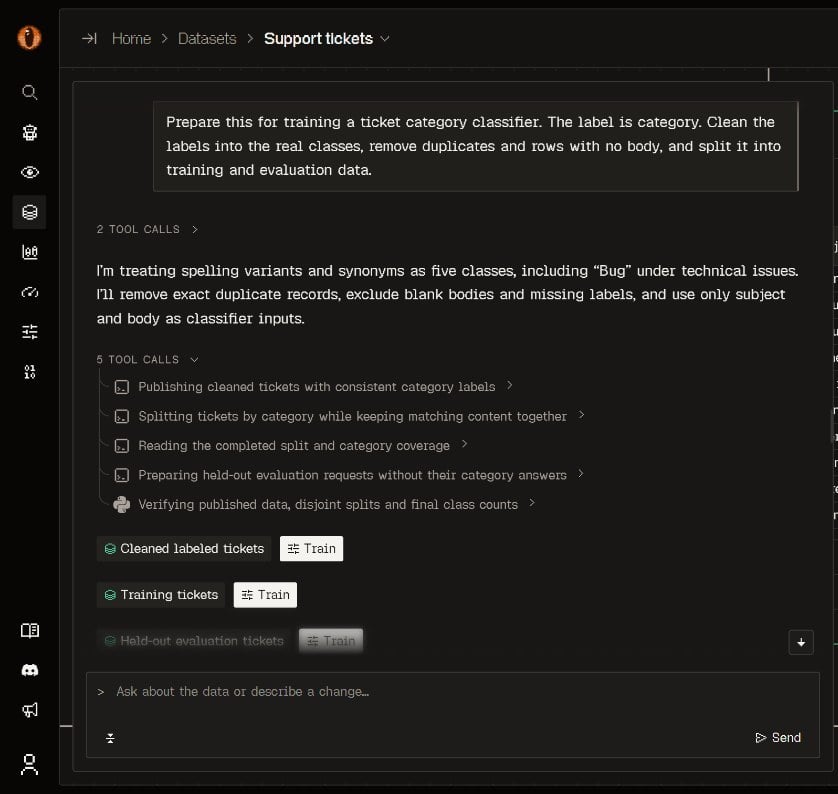
The assistant on a dataset page: the request, the reading it took, one line for each step, and the published versions.
3. Answer questions
The assistant acts on the most likely meaning of a request and says which meaning it took. It asks when the evidence cannot decide: one question, with the option that works with the data as it is first. Answer in the conversation.4. Continue from your coding agent
Everything the assistant makes is an ordinary project record. A connected agent reads the same dataset versions, retained packages and jobs over MCP: The assistant cannot reach your repository or machine. Training, evaluation, instrumentation and a model swap in your code stay with your coding agent.Boundaries
- A project has one workspace with no outbound network. It holds a read-only copy of each dataset version the assistant read, and each conversation has its own Python kernel and working folder.
- A kernel stops after 15 idle minutes. The next cell starts a new one with the same files and without the earlier Python variables.
- Deleting a dataset or a project deletes its copies from the workspace.
- A published version comes only from a saved package run by the platform, never from kernel output.
- The assistant never acts for an MCP connection.