Sign up or self-host, paste one prompt into your coding agent — then improve the agent with /overmind commands.
Overmind onboards through your coding agent. One pasted prompt installs the SDK, configures the MCP server, and syncs a snapshot of your codebase’s capabilities; after that, everything — instrumentation, datasets, training, optimisation — runs as /overmind commands from the same chat.
1
Get a console
Sign up at console.overmindlab.ai, or start the stack locally with docker compose up — see Self-hosting. Either way the Console’s first screen creates your project: the scoping unit for capabilities, traces, datasets, runs, models, and keys.
2
Copy the onboarding prompt
The Agent page opens empty. Pick your coding agent — Cursor, Claude Code, OpenCode, or Codex — and hit Copy onboarding prompt. The prompt carries a temporary account-scoped bootstrap key, so paste it only into your local coding agent, never into a shared chat.
3
Paste it into your coding agent
Open your repository in the coding agent (repo root as the workspace folder) and paste. The agent does the rest:
installs the overmind package with your repo’s own package manager
runs overmind init --ide <client> — installs the Overmind skill, the /overmind commands (Cursor and Claude Code), and the client’s MCP entry
runs overmind sync — creates the project, mints a project-scoped key into .overmind/credentials.toml, and finishes the MCP configuration
runs /overmind setup — scans the repository into overmind.toml and syncs your agent’s capabilities, prompts, tools, and trajectory maps, visible under Agent in the Console
Reload the IDE once after sync. The bootstrap key is never written to project files; local runs reuse the saved project credential from then on. Against a self-hosted API, the same prompt exports OVERMIND_API_URL first and overmind init takes --env local.
4
Improve the agent with /overmind commands
The synced capabilities are the starting point. From the same chat, each command drives one loop end to end:
Command
What it does
/overmind onboard
Connect this repository to Overmind
/overmind setup
Scan the repository and sync capabilities
/overmind ensure-tracing
Inspect traces and instrument the agent
/overmind dataset
Build, clean, upload, or export a dataset
/overmind finetune
Fine-tune, deploy, and smoke-test a model
/overmind optimise
Run prompt and code optimisation
/overmind backtest
Compare models in the repository
Plain /overmind routes to the right workflow when you’d rather describe the goal than pick a command. OpenCode and Codex get the same skill and MCP entry but no slash commands; describe the goal instead.
5
Watch it land in the Console
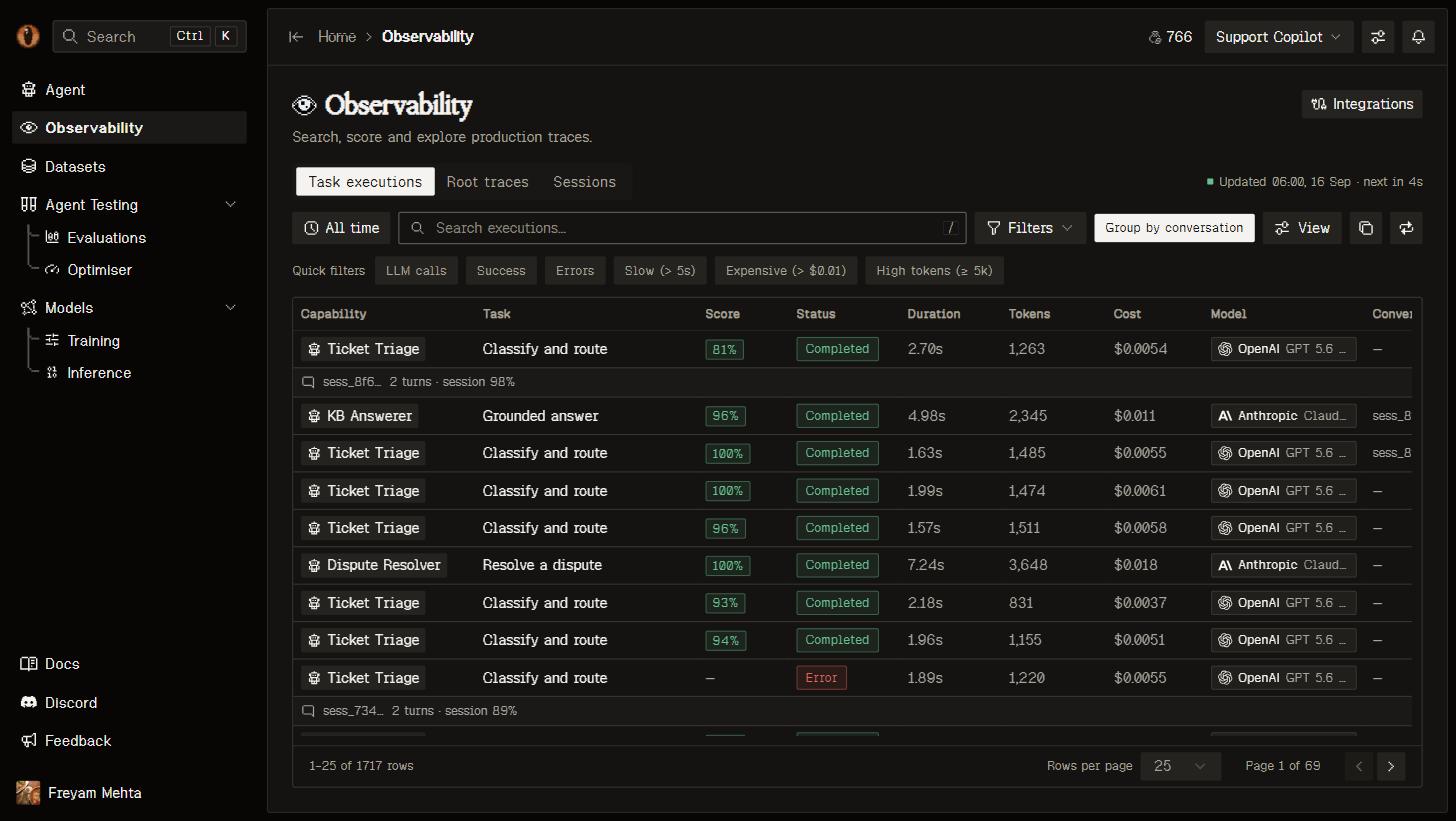
Once tracing is in, open Observability. The default Task executions view shows one row per scored unit of work; switch to Root traces for one row per trace. Click a row for the span tree, timeline, full model-call transcripts, and the verdicts with their reasoning.
Task executions: one row per scored unit, with the task it bound to and its execution score.
The Agent page fills in as each step lands: capabilities after the first sync, traffic and scores once traces arrive.
Deployed processes still need OVERMIND_API_KEY in their runtime secret configuration — the saved project credential covers local runs only. Not using Python or a coding agent? Any OpenTelemetry SDK can export straight to the OTLP endpoint.