
How a model is served
A deployment moves throughqueued → quantizing → deploying → warming → ready, or ends failed, deleting, deleted. Two shapes:
- A dense model trained on Modal with LoRA is served as an adapter on a shared BF16 base; deployments of the same base share one process and skip the
quantizingstage. - Everything else — full fine-tunes, mixture-of-experts models, models whose family has no adapter support — is merged and quantised into a private checkpoint (FP8 where the base supports it) and served from its own vLLM process.
Calling your model
Point any OpenAI-compatible client athttps://api.overmindlab.ai/api/v1 with your API key (Authorization: Bearer <key> or X-Api-Key: <key>). The model page’s View API snippet shows this for each model.
overmind.Client() reads OVERMIND_API_KEY and OVERMIND_API_URL, and exposes chat.completions.create(...) (streaming with stream=True), models.list(status=), models.get(id) and models.delete(id).
Two ids work in model:
- The deployment reference —
ft-<first 8 chars of the job id>-<base model>, the deployment’smodel_idon its page — pins one model. - The capability alias
overmind/<capability-uuid>resolves to the capability’sactive_model. Make live on a deployment retargets it; the next request hits the new model.
anthropic/, deepseek/, google/, meta-llama/, openai/, qwen/ and x-ai/ are frontier models the same endpoint forwards to OpenRouter, so a repository can switch between frontier and fine-tuned models by changing the id alone. They are listed only when the API has an OpenRouter key configured.
Request fields
POST /api/v1/chat/completions accepts model, messages, temperature, max_tokens, top_p, frequency_penalty, presence_penalty, tools, tool_choice, response_format, stream, stream_options.include_usage, reasoning_effort, include_reasoning and chat_template_kwargs. Unknown fields are ignored.
- Reasoning. For families that emit chain-of-thought,
include_reasoningdefaults tofalseandreasoning_effortto the family’s default; pass them explicitly to override.chat_template_kwargsis merged over the family’s defaults and forwarded to the chat template. max_tokens. Some families spend part of the budget on a preamble that cannot be turned off; a value below the family’s floor is raised to it so the answer is not empty.- Streaming.
"stream": truereturns SSEdata:events; the idle ping is an SSE comment line (:). - Non-streaming to a deployed model. The
200status line and a newline ping are sent before the model answers, and the JSON body follows as a chunked response. An upstream failure after that point arrives as{"error": {...}}inside the200body — check for anerrorkey, not only the status.
Error codes
Managing deployments
GET /api/v1/models lists ready deployments by default; ?status= accepts any deployment status or all, and anything else is 400. With ready or all the list also carries one overmind/<capability-uuid> row per capability whose active model is ready, and the OpenRouter frontier models when a key is configured. GET .../{model_id} accepts a deployment reference or an alias. DELETE on a deployment marks it deleting, removes it from the serving backend, marks it deleted and returns {"id": ..., "object": "model", "deleted": true}; the row stays, and a failed backend removal leaves it failed with a 502.
The Console uses the project API, /api/deployed-models/, for the rest:
Make live is
PATCH /api/capabilities/{id}/ with active_model set to the deployment. The CLI’s overmind model download-checkpoint <deployment-id> fetches the weights through checkpoints/.
The Console Inference page
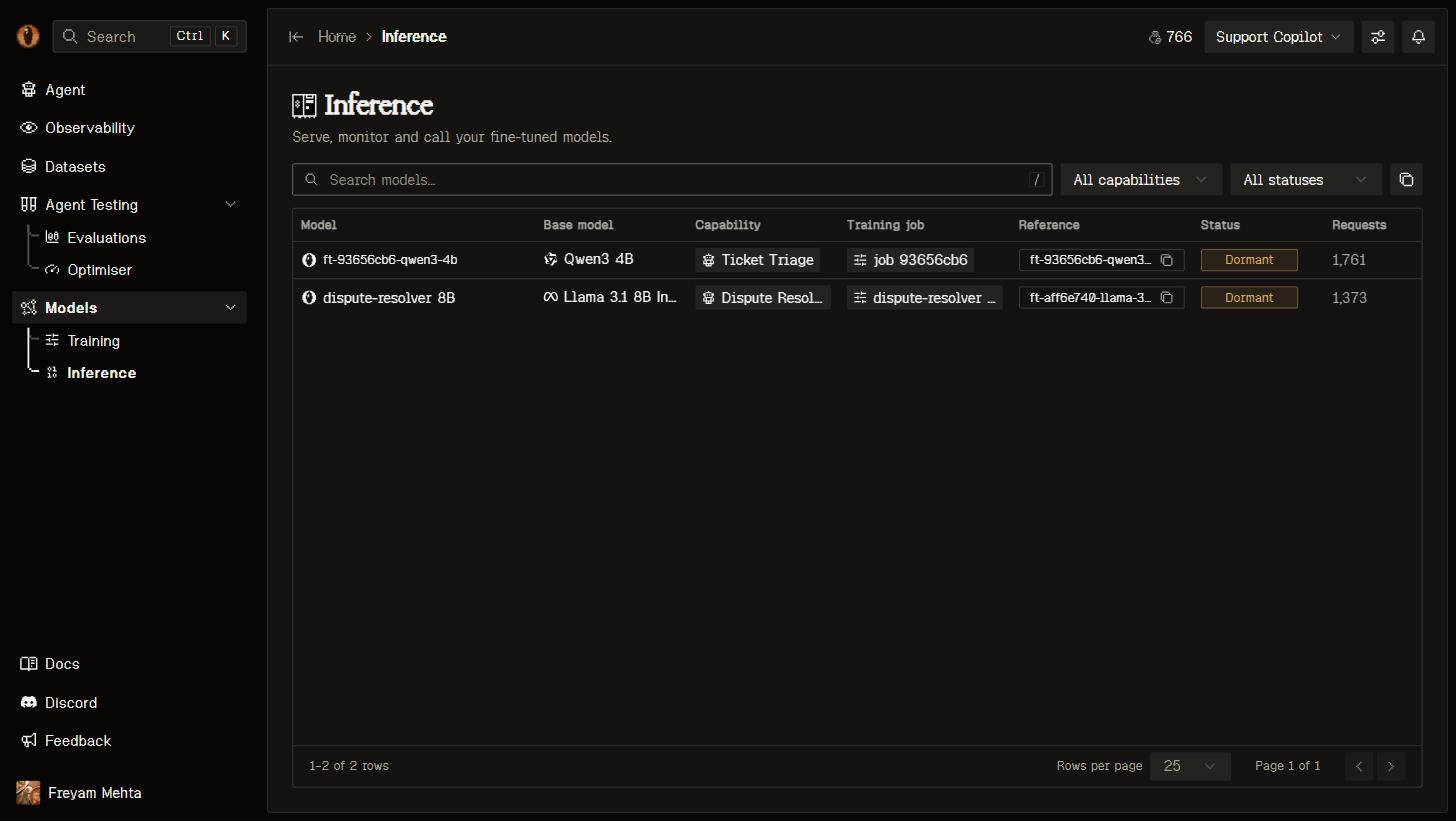
Inference: every deployed model with its lineage, status, and request metrics.
ready; a ready model shows its serving state from live/ — Live when it served a request in the last 90 seconds or the backend reports a running worker, Warming while a cold boot started within the last ten minutes is still in progress, Dormant otherwise.
The model page carries the same badge next to the reference, View API snippet, and View traces into Observability filtered to the model. The overview shows Requests, Tokens, Throughput and Latency, the context length, GPU and deployment time, the lineage (Base model, Capability, Training job) and Make live or the copyable model-swap prompt. Below it: Activity, Throughput and Latency charts from activity/, the Weights & checkpoints disclosure with Download weights, and Delete model under Danger zone. A failed or deleted model shows a banner with Retry or Deploy.
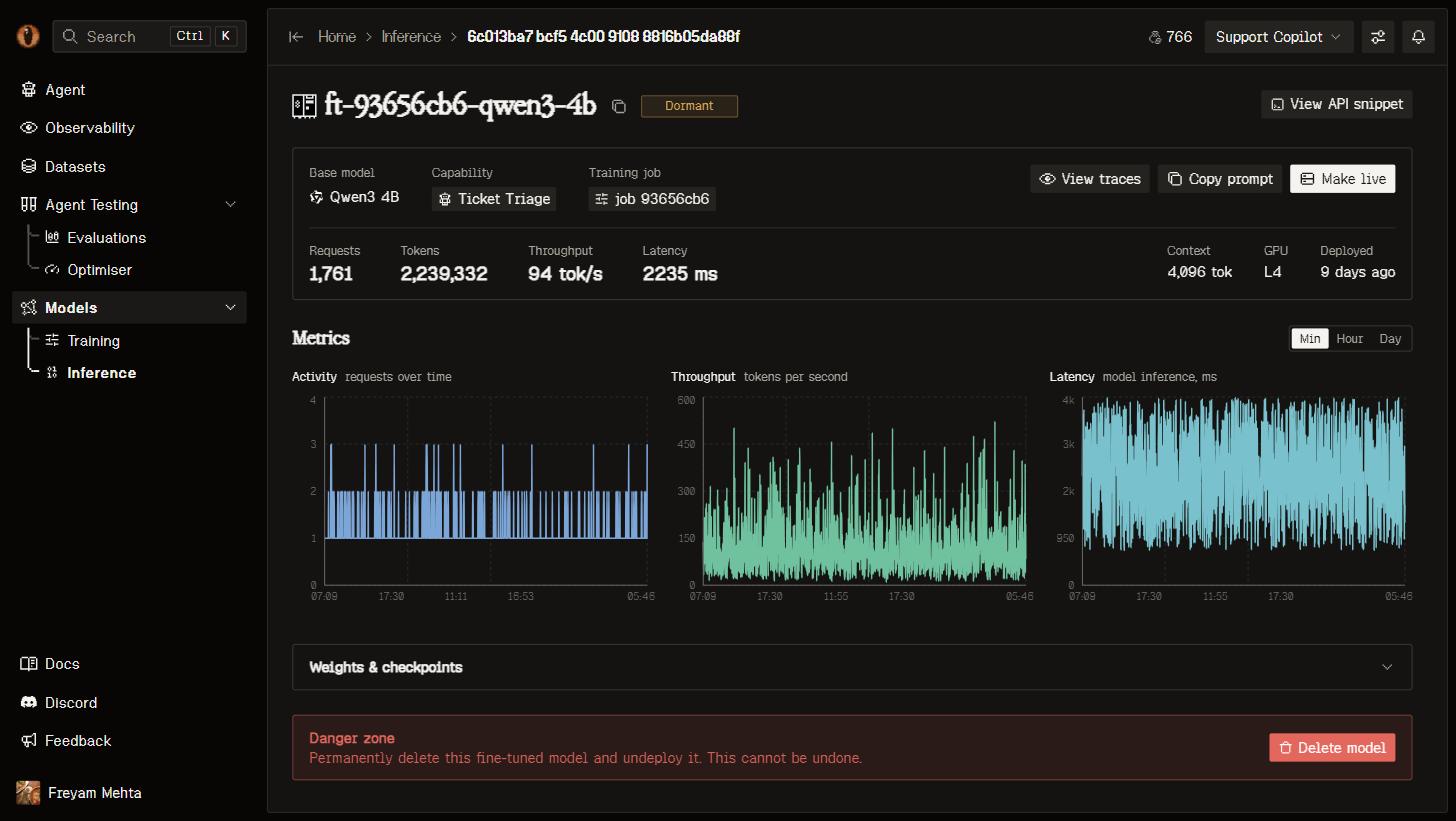
A model page: identity and metrics on top, request activity underneath.
Good to know
- Every request through the endpoint is recorded as an inference call and traced under the project, so a live fine-tuned model feeds the datasets for its next round of training.
- Quantisation adds a
quantizingstage to the first deployment of a merged model; adapter deployments skip it. - A retry after
failedstarts from the checkpoint download and re-runs the merge and quantisation.