
Two things describe what the table is for: the intent (
train or eval) and the capability it belongs to. Landing proposes both from the rows, the agent can change either from the chat, and both freeze the moment a version is used. Every version carries two measured contracts against them.
Nothing is reshaped on the way in and nothing is edited in place. To change the table you change a cell and run again; the cells after it run again in place and keep their version numbers. A version a run has read is frozen: its script is read-only, its frame cannot change, and so is every cell before it.
Landing a source
The New dataset dialog on the Datasets page takes a source, a name, a capability, and a purpose. The purpose is the intent: Decide from the rows leaves it pending for landing and the agent to settle, Evaluation and Training fix it, and Train + eval lands one source as two datasets,<name> train and <name> eval, with disjoint rows — you give the eval share as a percentage and where the eval rows come from (first, last, or a random draw that is the same every time). The source is read once, each half lands as its own cell 0 with the cut recorded in its source_spec beside the sibling’s id, and each dataset runs its own first agent turn. The dialog opens the train dataset; the eval one lands in the background.
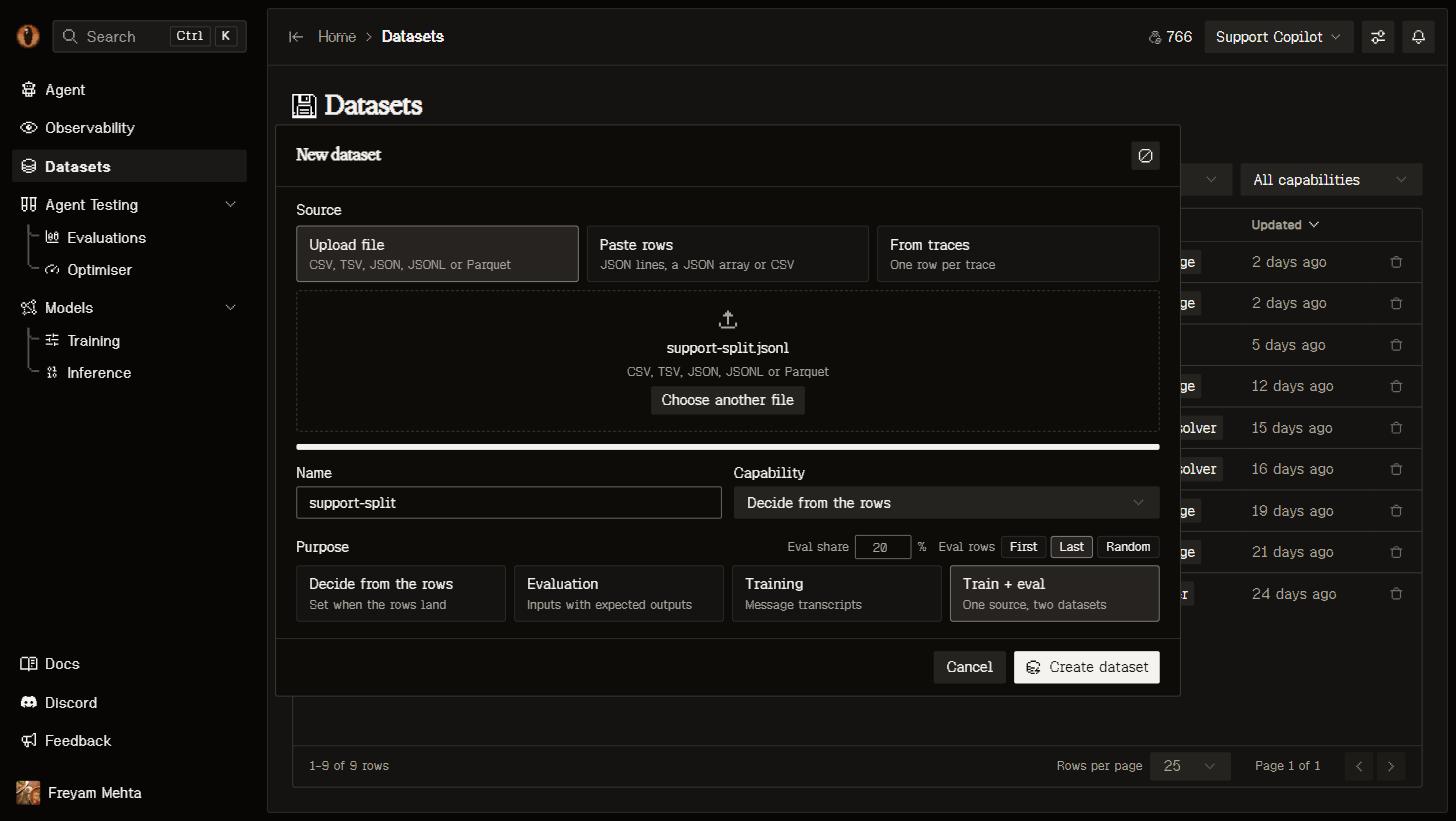
The New dataset dialog with Train + eval selected: the eval share and where its rows come from.
- From traces
- Upload or paste
Select rows in Observability and Add to dataset, or choose From traces in the dialog and land every trace matching the current filters. Each trace lands as one row:
trace_id, conversation_id, capability_id, capability, started_at, duration_ms, status, error, model, prompt_tokens, completion_tokens, cost_usd, the capability’s input and delivered output, the reconstructed messages and tools in the OpenAI wire shape, and score (the trace’s last trace scoring result, empty when unscored). A messages column already satisfies the training contract; for eval data the dataset’s agent renames output to expected_output. Splitting a transcript per assistant turn is one cell in the dataset’s chat.source_row index so later versions can be diffed value by value, scores every capability of the project against the rows (bound ids, the system turn, tool names, input keys) to propose one, and proposes the intent from the shape: transcripts with assistant turns are train, an input with a reference is eval, anything else is pending until the agent decides. The dataset is landing while that happens, diagnosing during the first agent turn, then idle; a failed landing lands in error with the reason.
The workshop
Opening a dataset lands you in the Data Workshop: a version strip down the left edge, the cells stacked in the middle, and the dataset’s agent on the right. There is no header: the name, the intent and the capability are the agent’s to change, from the chat.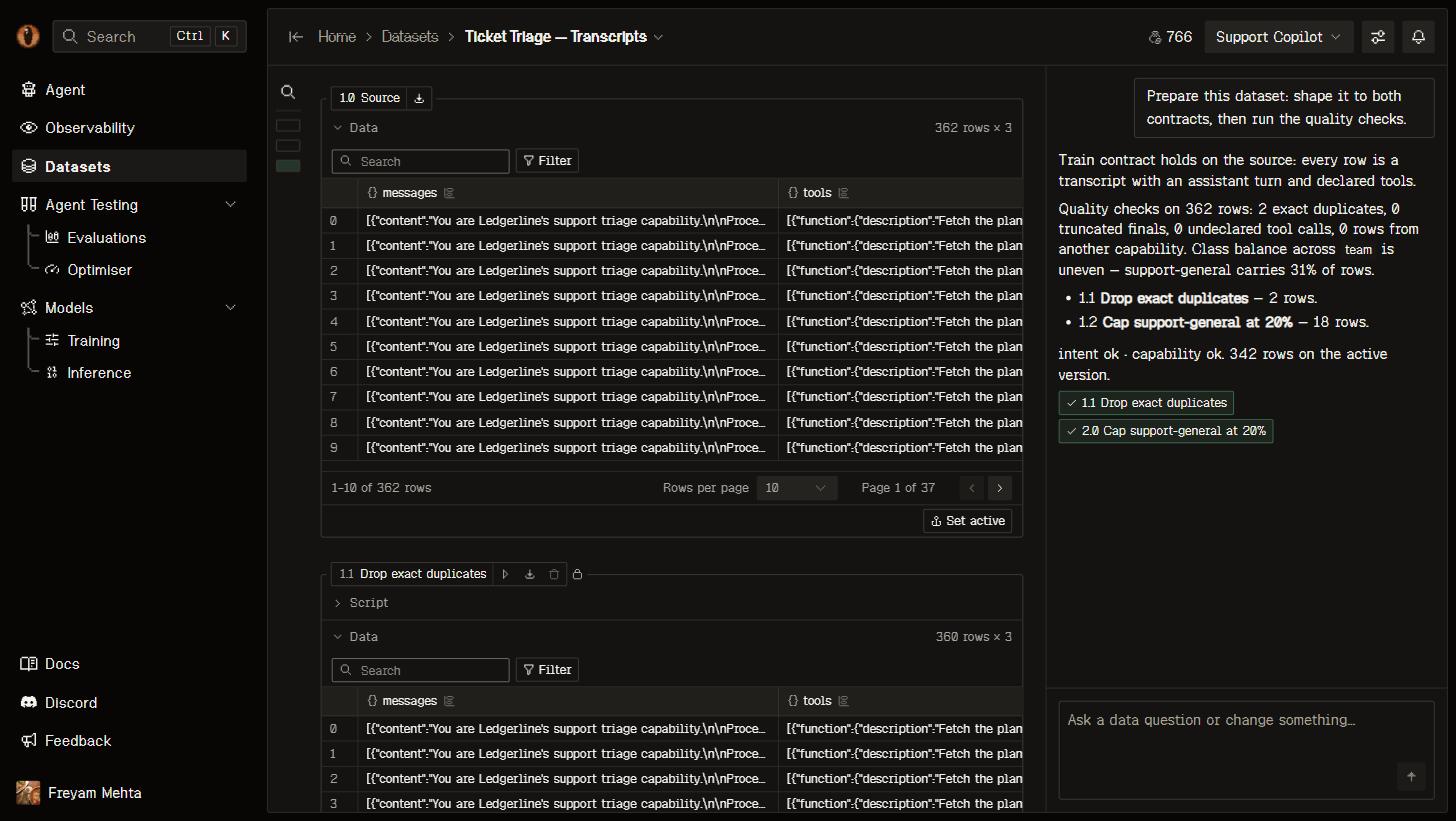
The Data Workshop: the version strip, the cell chain with the source frame, and the agent's first turn on the right.
- A cell is a title, a Python body and the frame it left. The body reads the previous frame as
df(pandas, withpdandnpbound) and leaves the next one indf. It runs in an isolated interpreter with a CPU and memory cap, no file or network access, and imports from the workshop’s library list: the standard library and a preloaded tier — pandas, numpy, pyarrow, DuckDB, scipy, scikit-learn, rapidfuzz, tiktoken, regex, jsonschema, langdetect, datasketch, dateutil, pyyaml — plus an installable tier (sentence-transformers, transformers, torch and others) the agent pulls in per project with itsinstalltool. - Under the script, the table marks new rows and changed values against the cell before, with the old value on hover.
- The active version’s cell carries the consumers: a train table offers Train a model; an eval table offers Run the optimiser and Use in a training job (the eval dataset that scores the job). Export sits in the cell’s title chip. Any other version offers Set active.
The agent
The chat on the right is the dataset’s own agent. It runs on the first engine the server has a key for — a Cursor Composer session, then OpenRouter, then an OpenAI, Anthropic, or Gemini key with a native tool-calling loop — and both engines carry the same thirteen tools over the chain:status, query (read-only SQL over a version), diff, try_script, inspect (a measuring script that lands nothing), add_cell, edit_cell, remove_cell, set_active, set_intent, set_capability, rename, and install. It writes a script, tests it against a version, and only then lands a cell, so a cell that lands has already run once. The turn’s engine and model are recorded on it. With no key configured the page opens and the agent says so; see Self-hosting.
The first landing starts one turn. It decides a pending intent, lands the fewest cells that make the active version meet both contracts, each run as it lands, then runs the quality checks an engineer would run for that intent — for train: refusals and truncated final turns, exact and near duplicates, length outliers, tool calls that do not parse or name an undeclared tool, a system turn that is not the capability’s, rows from another capability, class imbalance; for eval: missing required input keys, empty or trivial references, ambiguous duplicates, length outliers, leakage of the reference into the input, language mismatch, overlap with the train set — and lands one cell per finding that has rows behind it, run at once, with the count in its note. A fix that would drop more than half the rows lands as a proposal instead: it waits in the chat as a card with Run and Discard, never in the notebook — Run lands and runs it, Discard drops it. The name, the intent and the capability change through the chat too (ask the agent; a used version fixes the intent and the capability), and changing either re-measures every version. When a contract fails, the contract chip on the active version suggests only the moves that would change the verdict: Ask Overmind to fix it sends one turn on that contract alone (no quality pass); the other intent is offered when its shape already holds; a better-ranked capability is offered when the capability contract is the one failing. Each suggestion is a chat turn: the agent makes the change and re-aligns the chain.
After that the conversation is open. A request that changes the data is one new cell, run at once. A request to change an existing cell edits it in place and re-runs from there. A question is answered from the status, a query, or a diff between two versions.
Contracts
Every version is measured against two contracts, and the page reports whether the active version fits the intent:
The capability contract is vacuous when the capability declares nothing. Rows that fail are counted with the reason; a row that cannot meet a contract is a finding for the agent, never a default value. A training job whose eval dataset shares
trace_ids with the train version excludes those rows from training and says so in its log; the wizard shows the overlap before you launch.
Versions and uses
Every run — eval, optimiser, training — uses the version it read and links back to it. A use freezes that version and every cell before it, starts a new major number (1.3 becomes 2.0, the cells after it become 2.1, 2.2, …), and protects the frame: it cannot be deleted, and neither can its dataset. The worker re-hashes the frame before it starts, so a run never silently reads a file that changed underneath it.From a coding agent
The MCP tools cover the whole loop:list_datasets, inspect_dataset (the chain, a sample, the recent chat, and next actions), query_dataset (read-only SQL over one ran version), create_dataset_from_traces (with split for a train + eval pair), message_dataset_agent, and run_dataset (accept a proposal). Files go up through overmind dataset upload and versions come down through overmind dataset export, because bytes never cross MCP. See MCP and the CLI.
A local loop — the optimiser and backtests — never reads a dataset by id. It pulls the used version through the export endpoint, whose response carries X-Overmind-Cell, X-Overmind-Version, and X-Overmind-Fingerprint, and caches it as .overmind/datasets/<cell>.jsonl with the fingerprint beside it.