

How to use Overmind
The full Overmind workflow — install, initialize, and run optimization using Agent Skills in Cursor or Claude Code.
Use Agent Skills — slash commands in Cursor or Claude Code — to register your agent, generate policy, eval spec, and dataset, then run optimization. Each skill reads your codebase, infers what it can, asks for the rest, and runs that step.
New here? Getting Started is the 10-minute path from install to first run. Come back here for a full walkthrough of what each step does.
Prerequisites
Section titled “Prerequisites”Install Overmind and run overmind init from your agent project root:
pip install overmindovermind initovermind init creates .overmind/, sets up your API keys and analyzer model, and installs the Agent Skills into your IDE. It asks which platform you’re using (Cursor or Claude Code) and places skills accordingly:
| Platform | Skills location |
|---|---|
| Cursor | .cursor/skills/ |
| Claude Code | .claude/skills/ |
Re-run overmind init at any time to update the skills.
1. Register your agent
Section titled “1. Register your agent”In your Cursor or Claude Code chat panel, type:
/overmind-register-agent path/to/your/agent.pyThe assistant will:
- Read your agent source to understand its interface
- Ask whether you already have an Overmind-compatible entrypoint or need one created
- Confirm the agent name (defaults to the parent folder name)
- Ask which LLM provider your agent uses, so it can scaffold environment variable placeholders
- Run registration and verify it with a smoke check
If you already have a dataset, the assistant reconciles field names with your codebase before finalizing registration.
2. Generate the policy, eval spec, and dataset
Section titled “2. Generate the policy, eval spec, and dataset”Once your agent is registered, type:
/overmind-generate-spec-and-dataset my-agentThe assistant will:
- Analyze your agent code to determine input/output fields and the tools it uses
- Generate (or import) a policy document describing what correct behavior looks like
- Build an eval spec with scoring criteria, weights, and domain rules
- Generate a synthetic test dataset (or import your existing data)
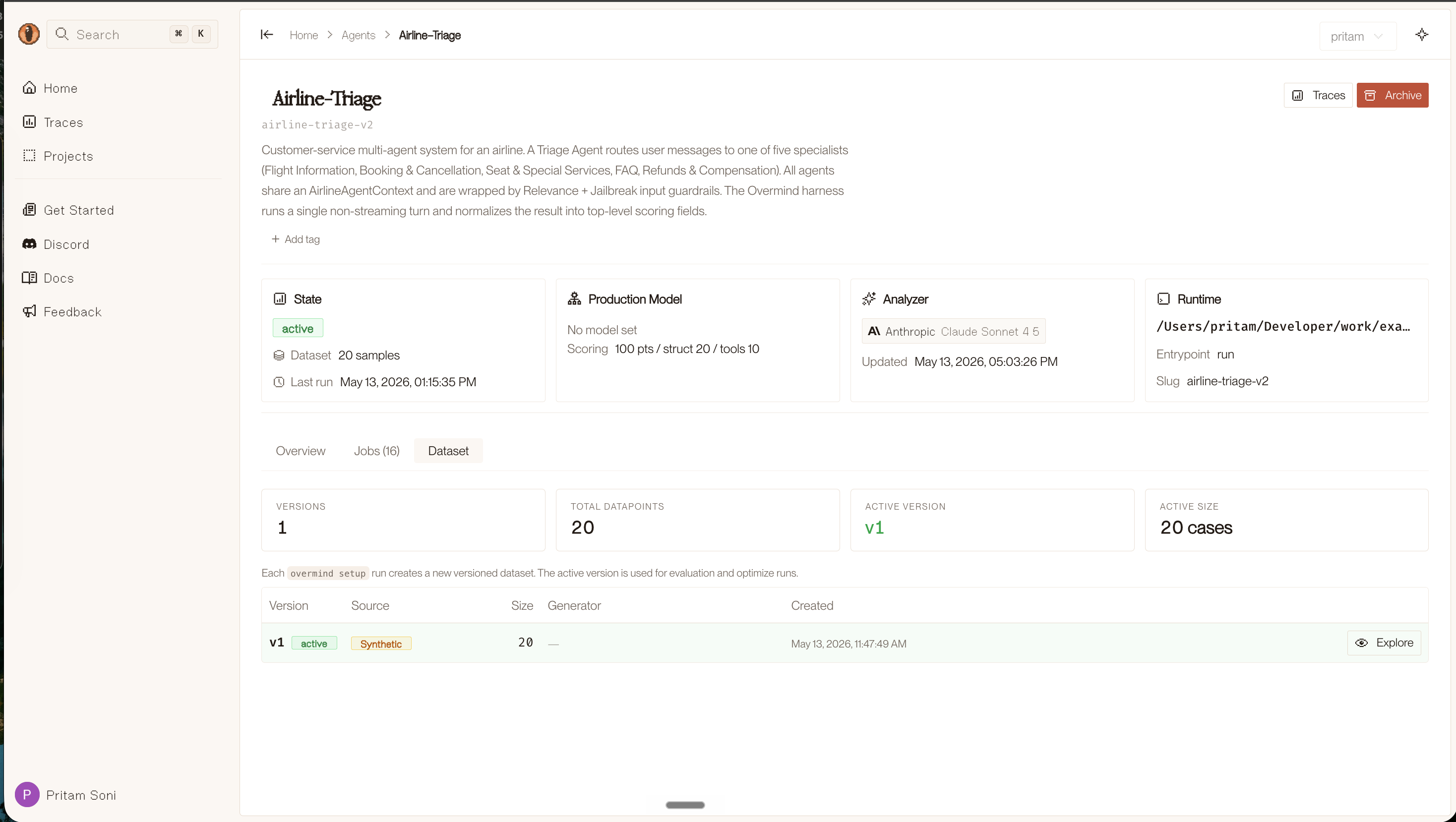
- Push all three artifacts to the Overmind backend, visible at console.overmindlab.ai
A preview of the policy and eval spec is shown before anything is saved. You can edit either before confirming.
If you already have a policy document or seed data, the skill asks for the path and uses it rather than generating from scratch.
The dataset is versioned in the console. Each run creates a new version; the active version is what the optimizer uses.
3. Optimize
Section titled “3. Optimize”Type in chat:
/overmind-optimize-agent my-agentThe assistant runs the full optimization loop end to end (eval on the dataset, parallel candidate edits in git worktrees, scoring, and acceptance). You can stick with defaults or adjust settings before it starts.
4. Review the results
Section titled “4. Review the results”Results are pushed to the Overmind backend as optimization runs. Navigate to console.overmindlab.ai/agents and select your agent to view:
| Artifact | Description |
|---|---|
| Policy | Agent policy document (human-editable) |
| Evaluation spec | Machine-readable scoring criteria |
| Dataset | Test dataset used for optimization |
| Best agent | The highest-scoring agent version |
| Score history | Score per iteration |
| Traces | Detailed traces of every agent run |
| Report | Summary with scores, improvements, and diffs |
Each optimization job shows the baseline score, the best score achieved, and a full iteration log with descriptions of every accepted and rejected change.
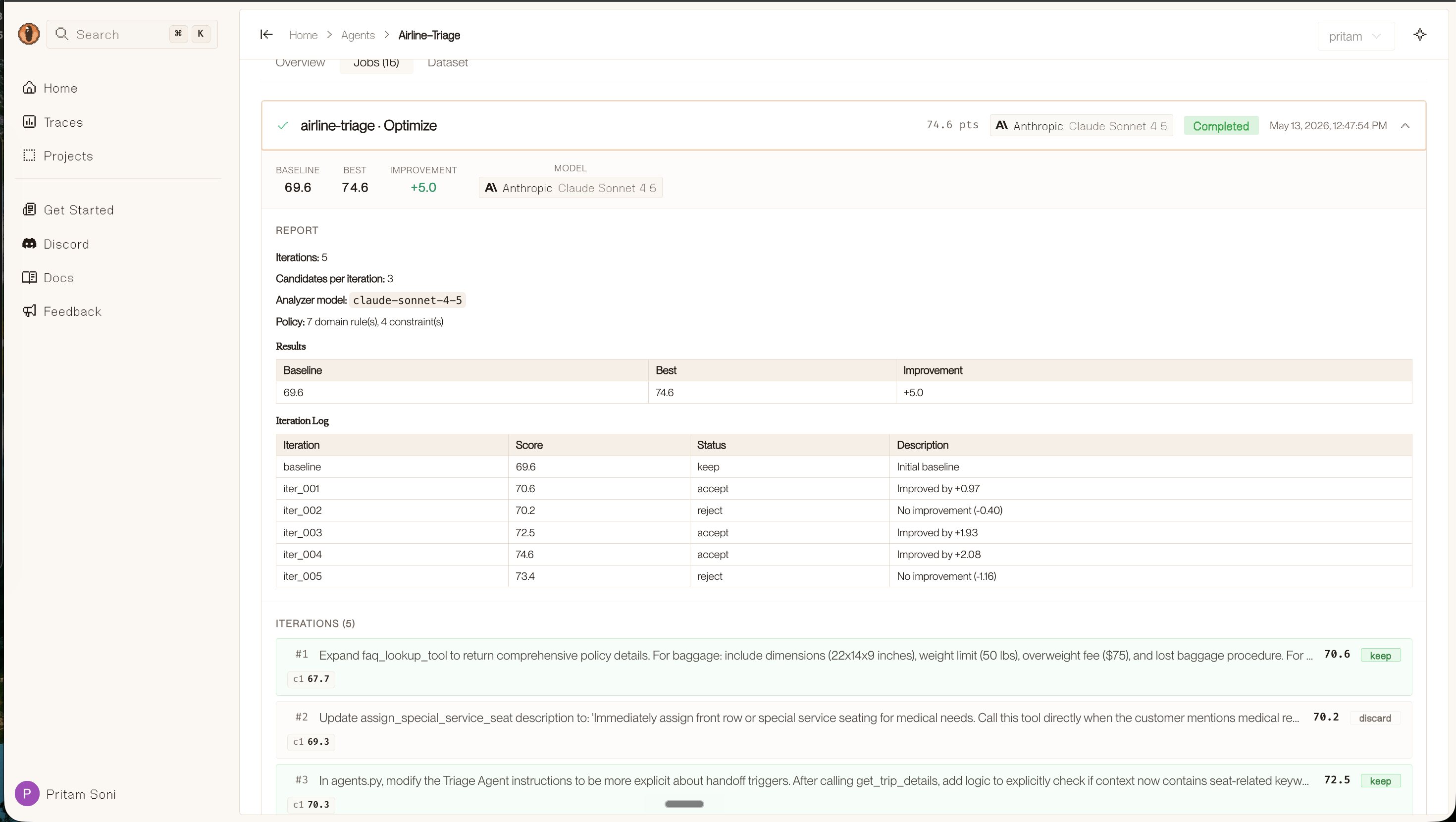
You can edit the policy or eval spec from the console and re-run /overmind-optimize-agent to continue improving from where you left off.
Available skills
Section titled “Available skills”Three skills cover the full workflow above:
| Skill | Slash command | What it does |
|---|---|---|
| Register Agent | /overmind-register-agent | Registers your agent in .overmind/agents.toml. Discovers the entrypoint, derives the module:function path, runs registration, and scaffolds env var placeholders. |
| Generate Spec & Dataset | /overmind-generate-spec-and-dataset | Generates the policy document, eval spec, and test dataset in a single pass; all three schemas are kept in agreement. |
| Optimize Agent | /overmind-optimize-agent | Drives the full optimization loop with parallel candidate generation, evaluation, and regression-aware acceptance. |
The full flow
Section titled “The full flow”1. pip install overmind && overmind init (terminal — one time per project) │ ▼2. /overmind-register-agent path/to/agent.py (Cursor / Claude Code chat) │ ▼3. /overmind-generate-spec-and-dataset my-agent (Cursor / Claude Code chat) │ ▼4. /overmind-optimize-agent my-agent (Cursor / Claude Code chat) │ ▼ console.overmindlab.ai/agents (view results)All commands run from the directory that contains .overmind/.
Using your own data
Section titled “Using your own data”When /overmind-generate-spec-and-dataset asks whether you have existing data, provide the path to your JSON file. Data files are arrays where each element has an input and expected_output:
[ { "input": { "company_name": "Acme Corp", "inquiry": "Need enterprise pricing" }, "expected_output": { "category": "hot", "lead_score": 85 } }]10–50 diverse cases is usually enough. If you don’t have data yet, the skill generates synthetic cases from the policy and agent description. See Optimizer Reference — Test data for the full dataset schema and examples.
Skill file locations
Section titled “Skill file locations”After overmind init, the skill files live here:
| Platform | Location |
|---|---|
| Cursor | .cursor/skills/overmind-register-agent/SKILL.md |
| Cursor | .cursor/skills/overmind-generate-spec-and-dataset/SKILL.md |
| Cursor | .cursor/skills/overmind-optimize-agent/SKILL.md |
| Claude Code | .claude/skills/overmind-register-agent/SKILL.md |
| Claude Code | .claude/skills/overmind-generate-spec-and-dataset/SKILL.md |
| Claude Code | .claude/skills/overmind-optimize-agent/SKILL.md |
These are plain Markdown files. Open and edit them if you want to customize how the AI agent handles a specific step.
Next steps
Section titled “Next steps”- Overmind Optimizer Reference — deep reference on policies, optimization settings, and output artifacts
- Example agents (GitHub) — ready-made agents to run through the full workflow
- console.overmindlab.ai — view results, policies, and score history