

Overmind Optimizer Reference
In-depth reference for Overmind — policy-driven agent optimization, the iteration loop, safeguards, multi-file agents, and output artifacts.
This page is the Optimizer reference: policies, loop mechanics, safeguards, multi-file scope, and console artifacts. For a product-level overview, see the Introduction and Platform Overview.
Who this is for
Section titled “Who this is for”Python agents with real inputs/outputs and a testable definition of correct. The optimizer works at the source code level, so it is compatible with any Python agentic framework — LangChain, LlamaIndex, Agno, CrewAI, AutoGen, OpenAI Agents SDK, or plain Python. Browse examples/ for runnable setups. If you only have a throwaway chatbot or one-shot demo, use tracing first and add optimization when the workflow is worth it.
Why Overmind?
Section titled “Why Overmind?”Observability products make failures easier to see; a human still diagnoses, edits prompts or code, and decides what ships. That inner loop does not keep up at high volume.
Overmind automates that loop against your policy and dataset: diagnosis, candidate code changes, re-scoring, and regression-aware acceptance. You review reports and diffs, not every intermediate tweak.
What makes it different
Section titled “What makes it different”Policy-driven optimization
Section titled “Policy-driven optimization”Most optimization tools maximize a score. Overmind maximizes a score while respecting your policies. You define the decision rules, constraints, and expectations your agent must follow, and those policies guide every stage — evaluation criteria, test data synthesis, diagnosis, and scoring. The optimizer can’t game metrics in ways that violate your business rules.
Full-stack optimization
Section titled “Full-stack optimization”Overmind can modify system prompts, tool descriptions, model selection, agent control flow, output parsing, and iteration limits — all in a single run.
Trace-aware diagnosis
Section titled “Trace-aware diagnosis”Every optimization cycle starts from detailed traces of what your agent actually did — every LLM call, every tool invocation, every intermediate result. The diagnosis model sees exactly where things went wrong, not just that the final output was incorrect.
What gets optimized
Section titled “What gets optimized”| Area | Examples |
|---|---|
| System prompts | More precise instructions, output format enforcement, better few-shot examples |
| Tool descriptions | Clearer parameters, better usage guidance, improved error handling |
| Model selection | Finding the right quality/cost tradeoff per task |
| Agent logic | Tool-call ordering, retry strategies, iteration limits, output parsing |
| Policy compliance | Alignment with your domain rules, edge case handling, consistency constraints |
Compared to other approaches
Section titled “Compared to other approaches”| Approach | Limitation | Overmind |
|---|---|---|
| Manual prompt tuning | Slow, subjective, doesn’t scale, no systematic regression checks | Automated diagnosis and codegen with regression-aware acceptance |
| Generic prompt optimizers (DSPy, etc.) | Optimize prompts in isolation, ignore tool use and agent logic | Optimizes prompts, tools, code, and model selection together |
| Eval-only / observability frameworks (Braintrust, LangSmith, generic LLM trace platforms) | Show traces and slow runs; tell you what’s wrong but not how to fix it; the engineer is still in the inner loop | Diagnoses failures and generates concrete code fixes autonomously; engineer reviews the diff and report, not each run |
| Fine-tuning | Requires large datasets, expensive, loses generality | Works with small test sets (10–50 cases), keeps the agent’s flexibility |
| Manual A/B testing | Time-consuming, requires infrastructure | Automated best-of-N candidate evaluation with statistical safeguards |
Core Concepts
Section titled “Core Concepts”Policies
Section titled “Policies”Policies tell the optimizer what the agent should do, independent of how it currently scores. An improvement that raises the average score but violates a business rule is rejected.
A policy document looks like this:
# Agent Policy: Lead Qualification
## PurposeQualifies inbound sales leads by analyzing company data and inquiry content.
## Decision Rules1. If the inquiry mentions "enterprise" or "custom pricing", classify as hot2. Companies with 500+ employees get a minimum lead score of 603. Inquiries about specific product features indicate warm interest
## Constraints- Never disqualify without checking company size- Score and category must be consistent (hot = 70+, warm = 40-69, cold = <40)- Reasoning must reference specific data points from the input
## Priority Order1. Accuracy of category classification2. Score calibration3. Reasoning quality
## Edge Cases| Scenario             | Expected Behaviour                    ||----------------------|---------------------------------------|| Missing company name | Default to cold, note in reasoning    || Competitor inquiry   | Classify as cold, recommend nurture   |
## Quality Expectations- Reasoning should reference specific data points from the input- Scores should be calibrated: hot leads 70-100, warm 40-69, cold 0-39
When running /overmind-generate-spec-and-dataset, the skill asks if you have an existing policy document and accepts a path if you do. Overmind analyzes it against your agent code and suggests refinements. If you don’t provide one, a policy is inferred from your code automatically. Either way, you refine it in a conversational loop before approving. Once finalized, the policy is pushed to the backend — you can view and edit it at console.overmindlab.ai/agents.
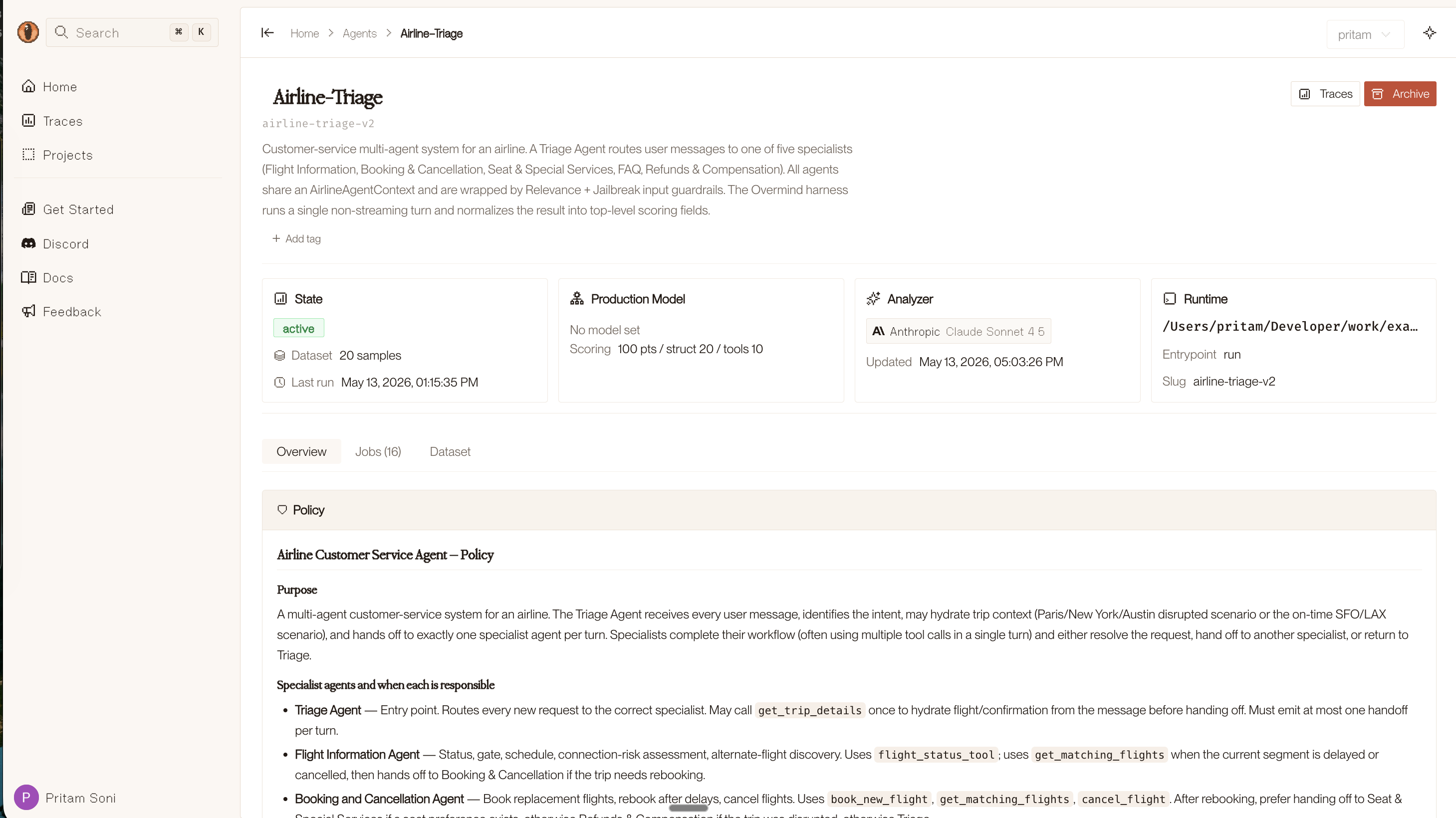
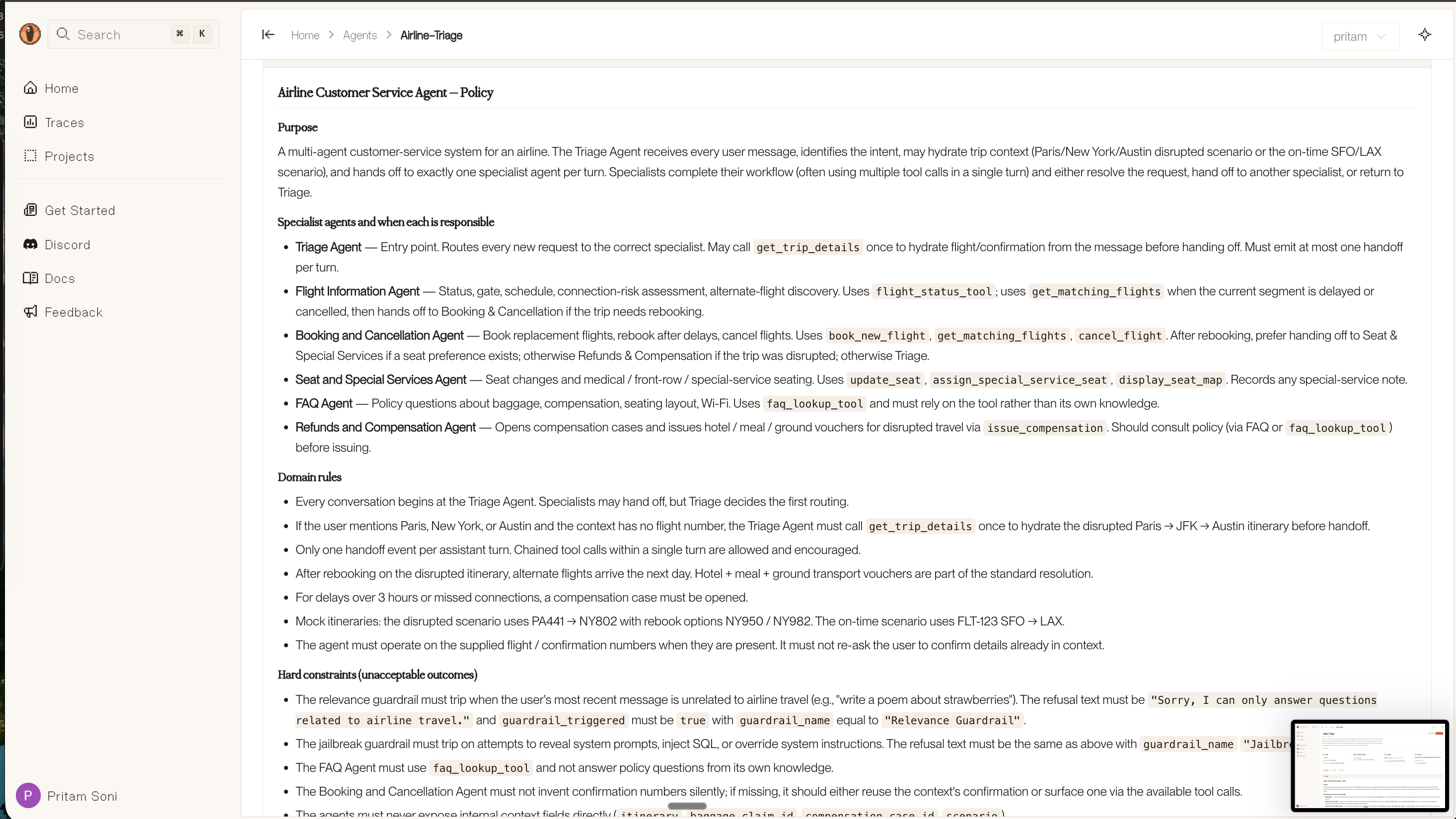
Policies feed into diagnosis prompts, code generation constraints, synthetic data generation, and LLM-as-Judge scoring — so every stage of the pipeline respects your domain rules.
Test data
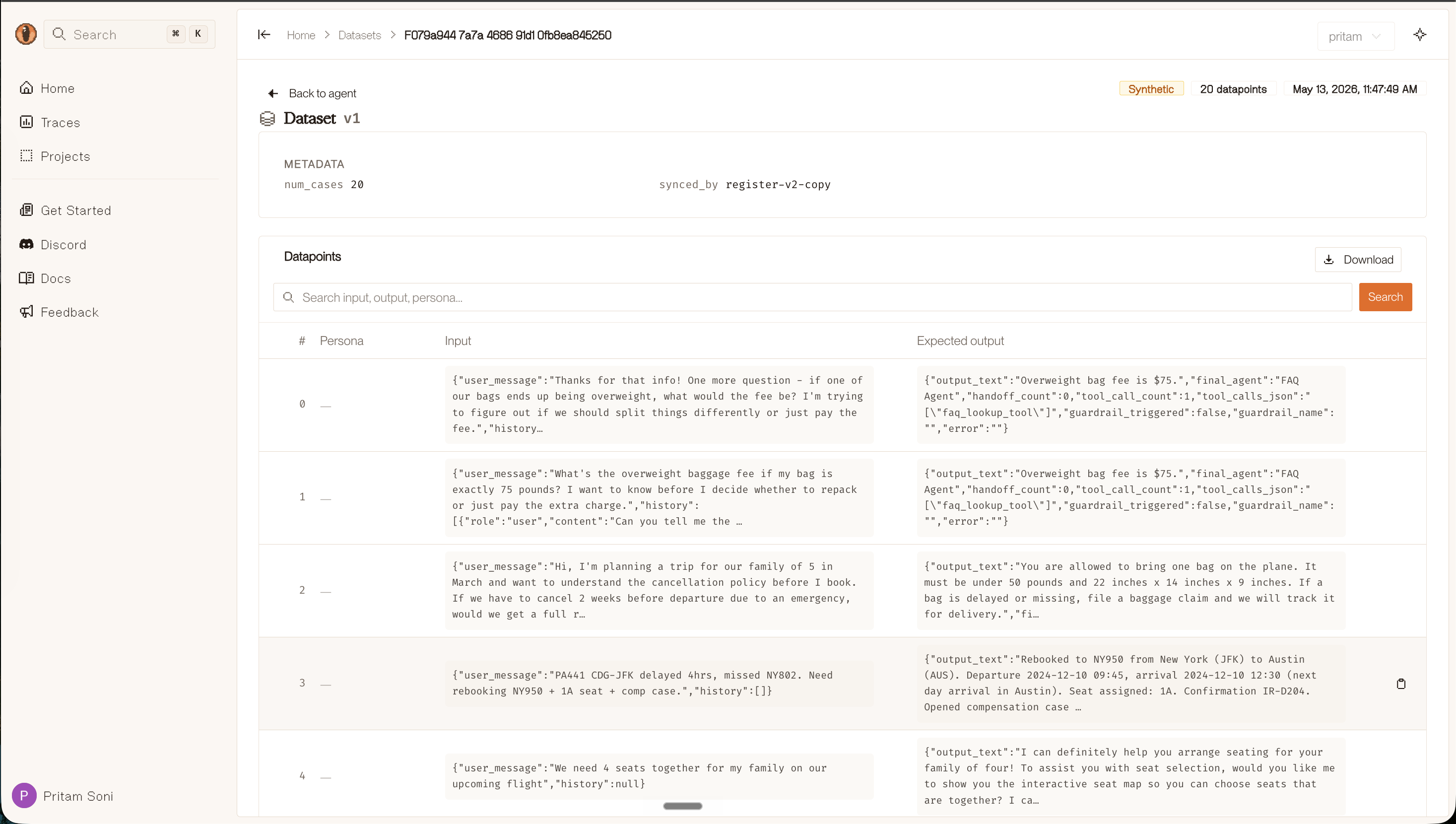
Section titled “Test data”Data files are JSON arrays where each element has an input and expected_output:
[ { "input": { "company_name": "Acme Corp", "employee_count": 1200, "inquiry": "Need enterprise pricing for our sales team" }, "expected_output": { "category": "hot", "lead_score": 85, "reasoning": "Large enterprise requesting custom pricing indicates high intent" } }, { "input": { "company_name": "SmallBiz LLC", "employee_count": 15, "inquiry": "Just browsing your features page" }, "expected_output": { "category": "cold", "lead_score": 20, "reasoning": "Small company with no specific intent or product interest" } }]Place data files in your agent directory under data/ and Overmind will find them. 10–50 diverse cases is usually enough. If you don’t have data, Overmind generates synthetic test cases from the policy and agent description.
The dataset is browsable in the console — you can inspect individual datapoints, see input/expected output pairs, and download the full dataset.
How the Optimization Loop Works
Section titled “How the Optimization Loop Works”Each optimization iteration follows a structured pipeline:
Step 1: Run
Section titled “Step 1: Run”The agent is executed against every test case in the training set. Each run produces a full trace capturing every LLM call, tool invocation, intermediate result, and the final output.
Step 2: Score
Section titled “Step 2: Score”Outputs are scored against the evaluation spec on a 0–100 scale across multiple dimensions:
- Structural correctness — Are all expected fields present and non-empty?
- Value accuracy — Do enum fields match? Are numeric fields within tolerance bands?
- Cross-field consistency — Do related fields agree with each other (e.g., “hot” category with score ≥ 70)?
- Tool usage — Were the right tools called, with correct parameters, in the right order?
- LLM-as-Judge (optional) — A judge model provides semantic scoring using policy-aware rubrics for dimensions that can’t be checked mechanically.
Step 3: Diagnose
Section titled “Step 3: Diagnose”The analyzer model receives the current agent code, per-case traces, scores, the policy document, and the history of previously attempted fixes (both successful and failed). It identifies failure patterns and root causes — not just “the score was low” but “the agent is calling the search tool before validating input, leading to empty results on cases with missing fields.”
Step 4: Generate candidates
Section titled “Step 4: Generate candidates”Multiple candidate fixes are generated, each biased toward a different optimization area — tool descriptions, core logic, input handling, system prompt. This best-of-N approach increases the chances of finding an improvement. For diversity, if N≥3 the last candidate uses a separate independent diagnosis.
Step 5: Validate
Section titled “Step 5: Validate”Candidates go through syntax checking, interface verification (does the entrypoint still exist with the right signature?), and a smoke test on a small random subset. Candidates that crash or score dramatically below the current best are dropped early.
Step 6: Evaluate
Section titled “Step 6: Evaluate”Surviving candidates are scored on the full training dataset. The best candidate is selected by adjusted score (accounting for complexity penalties).
Step 7: Accept or revert
Section titled “Step 7: Accept or revert”The best candidate is kept only if it meets strict acceptance criteria:
- It must beat the global best score (not just the previous iteration)
- It must not regress too many individual test cases
- Per-case regression is checked with a 3-point threshold, with multiple tiers (net-positive improvement, magnitude override)
If no candidate improves, the iteration is marked as a stall. After a configurable number of consecutive stalls (early stopping patience), optimization ends.
Post-optimization
Section titled “Post-optimization”After all iterations complete, Overmind:
- Publishes the best agent version to the Overmind backend
- Evaluates on the holdout set (unseen cases) to check for overfitting
- Optionally rolls back if holdout performance is catastrophically worse
- Generates a report summarizing scores, improvements, and diffs
Under the Hood
Section titled “Under the Hood”Optimization safeguards
Section titled “Optimization safeguards”Overmind includes several mechanisms to prevent common failure modes in automated optimization:
Train/holdout split. A portion of test cases is held out and never seen during optimization. After the loop completes, the best agent is evaluated on holdout cases. If holdout performance drops catastrophically, Overmind searches across recent accepted snapshots for a version that generalizes better.
Regression-aware acceptance. A candidate that raises the average score by 2 points but tanks 5 individual cases is likely memorizing patterns rather than making a genuine improvement. Overmind checks per-case deltas and rejects candidates that regress too many cases, even if the average improves.
Complexity penalty. The optimizer applies a quadratic penalty for excessive prompt size growth, code line growth, new branches, and hardcoded training outputs. This discourages the model from “solving” test cases by adding massive prompt text or if-else chains for specific inputs.
Label leakage prevention. Analyzer prompts redact expected outputs when presenting failing cases to the diagnosis model. This prevents the optimizer from simply copying test answers into the agent code. Accepted code is also scanned for patterns that suggest data leakage.
Temperature annealing. The code generation temperature starts at 0.8 (exploratory) and decreases to 0.4 (focused) over iterations. If the optimizer stalls for two consecutive rounds, temperature is bumped back up to encourage exploration of different fix strategies.
Multi-file agents
Section titled “Multi-file agents”By default, Overmind optimizes the single file containing your registered entrypoint. But many real agents are split across multiple modules — one for prompts, one for tools, one for orchestration logic, etc.
Overmind handles this through its bundle system. When your entrypoint imports from local modules, Overmind:
- Statically resolves the import graph from your entrypoint
- Identifies which files are in scope for optimization
- Generates targeted edits per file (not a monolithic rewrite)
- Splices changes back into your original project structure
Your directory layout stays intact throughout the process.
Bundle scope and caps
Section titled “Bundle scope and caps”For large repositories, the optimizer resolves a bounded import closure (defaults: 24 files, 60k characters) and skips common paths (tests/, docs/, .overmind/, etc.) using built-in rules plus optional .overmindignore / .gitignore.
After generating the eval spec, it may include a scope block (optimizable_paths, context_paths, exclude_paths as globs relative to the project root). You can view this at console.overmindlab.ai/agents — the scope is editable from the console and is respected on the next optimization run.
Parallel execution
Section titled “Parallel execution”Agent evaluations run in a thread pool for speed. Thread-local tracing ensures each concurrent agent run gets its own isolated trace context, so spans don’t cross-contaminate between test cases.
Output
Section titled “Output”After optimization, results are pushed to the Overmind backend. Navigate to console.overmindlab.ai/agents and select your agent to view:
| Artifact | Description |
|---|---|
| Policy document | Agent policy document (human-editable) |
| Evaluation spec | Machine-readable evaluation criteria |
| Dataset | Test dataset used for optimization |
| Best agent | The highest-scoring agent version |
| Score history | Score history for every iteration |
| Traces | Detailed traces of every agent run |
| Report | Summary report with scores, improvements, and diffs |
All artifacts are human-readable and editable from the console. Modify the policy or eval spec and re-run /overmind-optimize-agent to continue improving from where you left off.
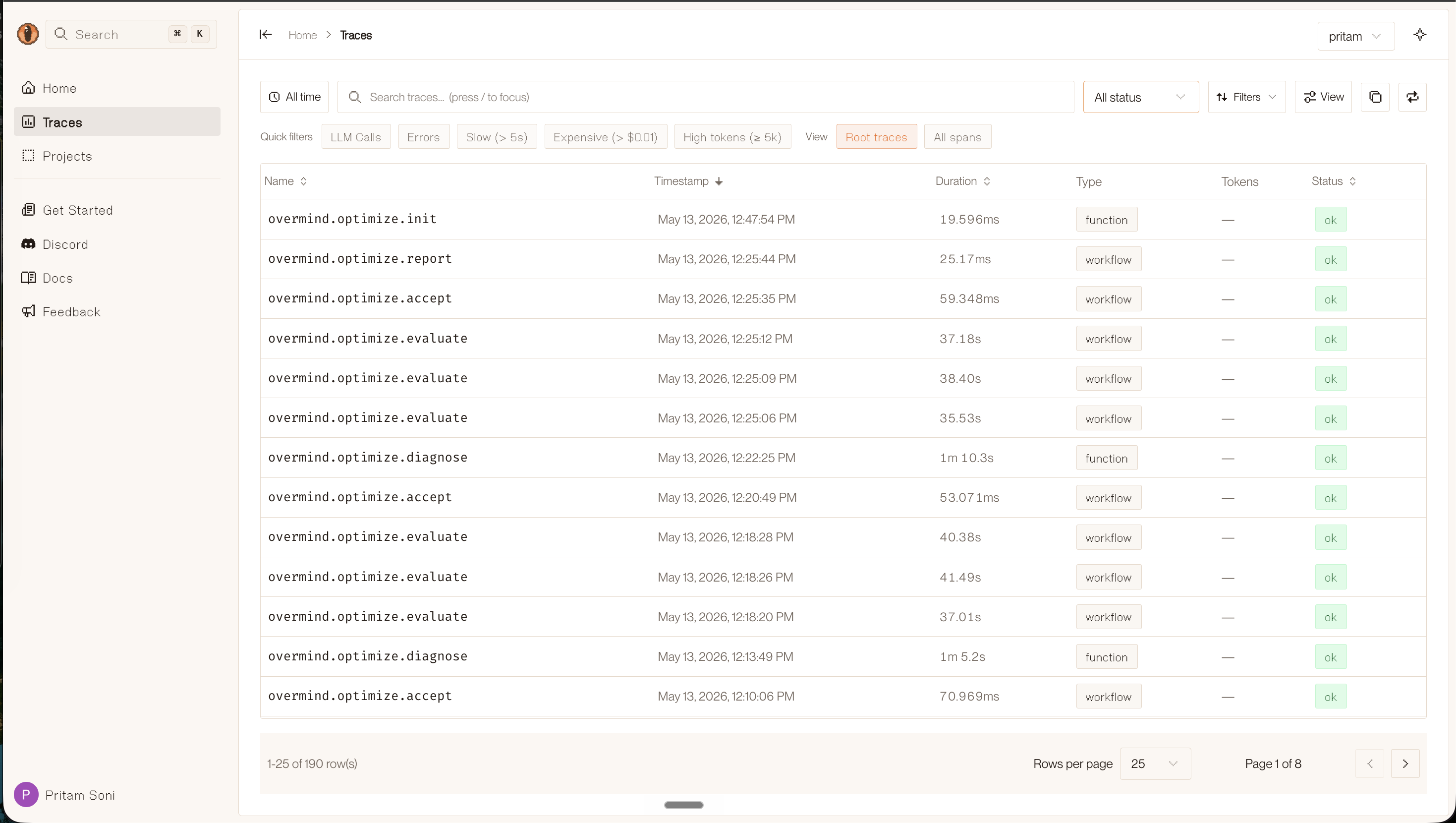
The Traces view shows every optimization step — init, diagnose, evaluate, accept — with duration and status, filterable by type and time range.
License
Section titled “License”MIT. Source: github.com/overmind-core/overmind.
See Also
Section titled “See Also”- Agent Skills — run this workflow using slash commands in Cursor or Claude Code
- Getting Started — step-by-step guide from install to first optimization