> ## Documentation Index
> Fetch the complete documentation index at: https://docs.overmindlab.ai/llms.txt
> Use this file to discover all available pages before exploring further.
# Quickstart
> The easiest way to get started with Overmind.
Overmind has first class integration with cursor, claude code, opencode, and codex through our SKILL `/overmind` and MCP server, after signing up you can pretty much do everything from your coding agent.
> We've built the experince to be as easy and native to your coding agent as possible.
Start by signing up at [console.overmindlab.ai](https://console.overmindlab.ai)
Pick your coding agent — **Cursor**, **Claude Code**, **OpenCode**, or **Codex** — and hit **Copy onboarding prompt**.
Paste the prompt into your coding agent (repo root as the workspace folder) and hit enter.
* Overmind will now scan your repository for [AI Agents & Capabilities](/core/capabilities#the-scan), you can see them in the [Console](https://console.overmindlab.ai)
* If you want any changes in how they are grouped, evals, etc, just ask your coding agent to do it.
* Next step is to ensure your codebase is instrumented properly for [tracing using OTLP endpoint](/core/observability#the-otlp-endpoint), just run `/overmind ensure-tracing` in your coding agent.
The pushed capabilities are the starting point. From the same chat, each command drives one loop end to end:
| Command | What it does |
| -------------------------- | ------------------------------------------------------- |
| `/overmind ensure-tracing` | Inspect codebase and instrument it properly for tracing |
| `/overmind dataset` | Build, clean, upload, or export a dataset |
| `/overmind finetune` | Fine-tune, deploy, and smoke-test a model |
| `/overmind optimise` | Run prompt and code optimisation |
| `/overmind backtest` | Compare models in the repository |
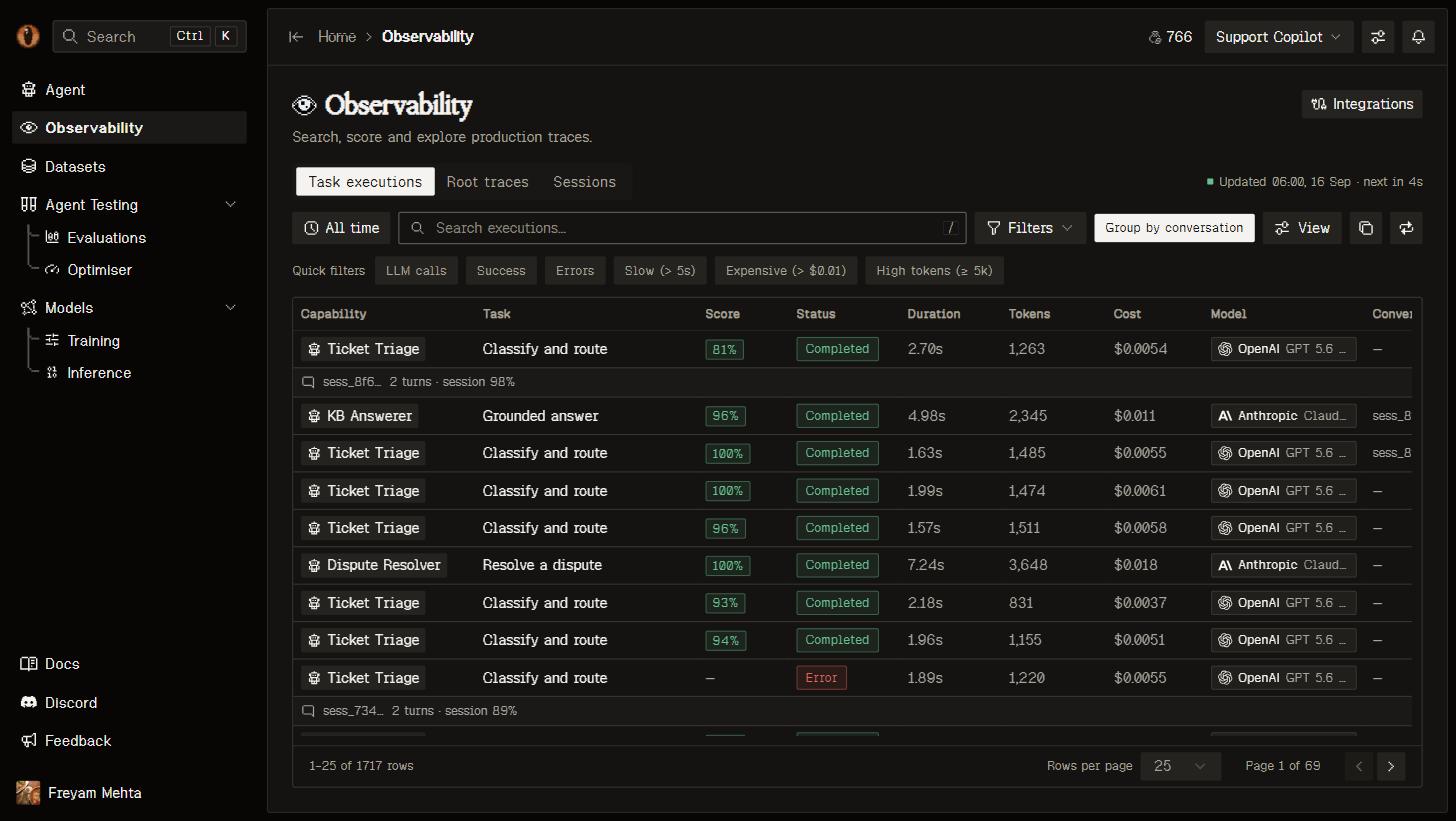
Once tracing is in, open **Observability**.
 ## Next steps
Bracket each run with `overmind.run()` and add `@tool` and `@observe` spans so traces mirror your agent's real control flow.
What sync uploaded: capabilities, prompts, tools, behaviours, and the trajectory map.
Select traces and land them as an eval or training dataset with provenance intact.
The tool catalog your coding agent already has after onboarding.
## Next steps
Bracket each run with `overmind.run()` and add `@tool` and `@observe` spans so traces mirror your agent's real control flow.
What sync uploaded: capabilities, prompts, tools, behaviours, and the trajectory map.
Select traces and land them as an eval or training dataset with provenance intact.
The tool catalog your coding agent already has after onboarding.