> ## Documentation Index
> Fetch the complete documentation index at: https://docs.overmindlab.ai/llms.txt
> Use this file to discover all available pages before exploring further.
# Datasets
> Turn your production traffic into the eval and training data your runs read.
A dataset is the data your eval runs, optimisation runs and training runs read. You bring rows — selected traces, a file, pasted text — and shape them until they fit what you need. Overmind's own agent does most of that shaping for you.
Two things say what a dataset is for: its **intent** (`train` or `eval`) and the **capability** it belongs to. Both are proposed when it lands and both can be changed by asking, until a run has used it.
## Create a dataset
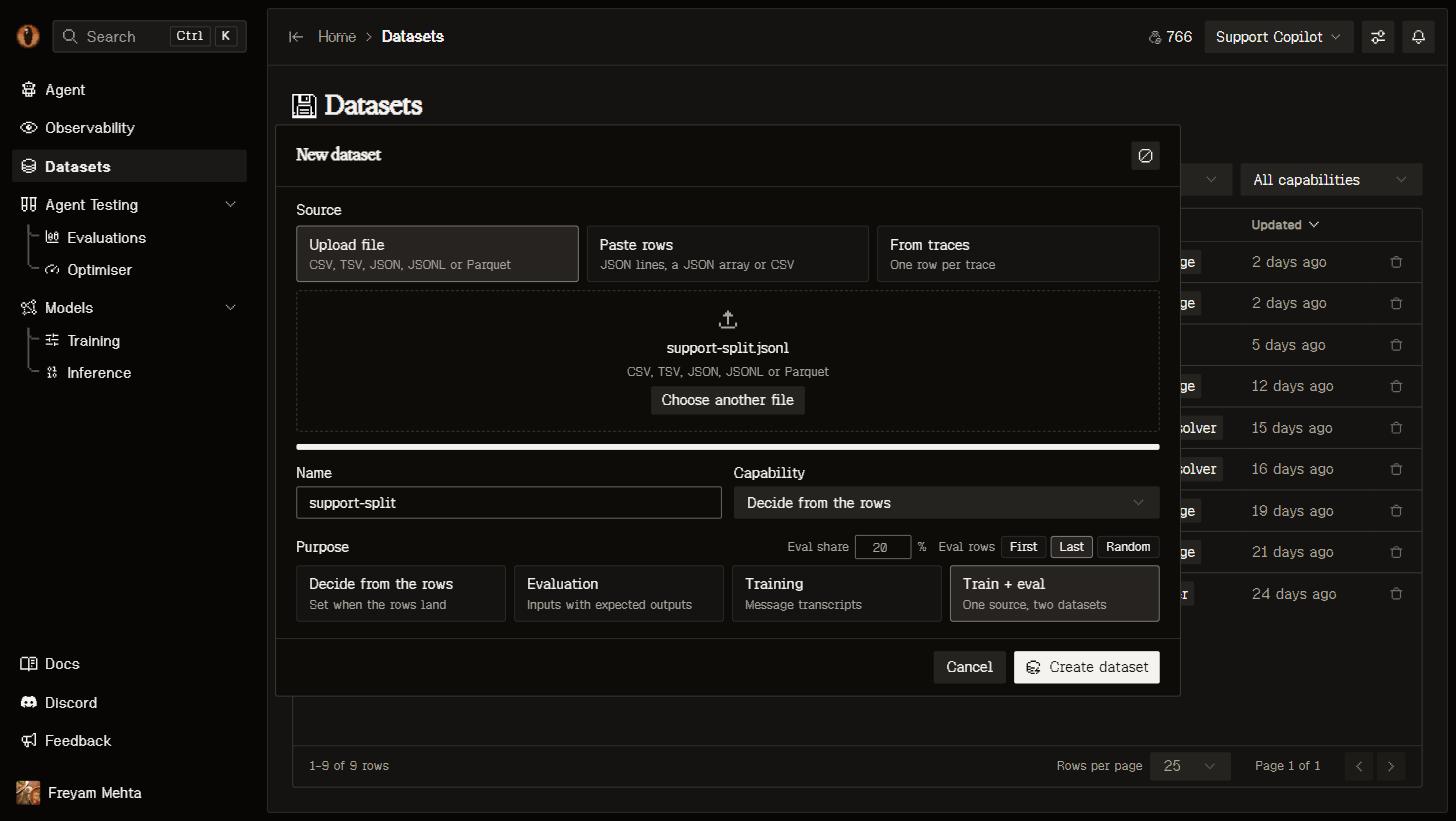
**New dataset** on the Datasets page takes a source, a name, a capability and a purpose. **Decide from the rows** lets Overmind settle the intent for you; **Evaluation** and **Training** fix it.
 Select runs in [Observability](/core/observability#from-traces-to-datasets) and **Add to dataset**, or choose **From traces** to take everything matching your current filters.
Each run lands as one row: its input and delivered output, the full transcript and tools in OpenAI wire shape, model, tokens, cost, status, duration and its score. A transcript already satisfies the training contract; for eval data the agent renames `output` to `expected_output` for you.
Drop a **CSV, TSV, JSON, JSONL or Parquet** file anywhere on the Datasets page, or paste rows straight into the dialog. Files can be gzipped and up to 2 GB. Columns and types come from the file — numbers stay numbers, nested JSON stays JSON.
From a terminal: `overmind dataset upload FILE [--intent train|eval] [--capability ]`. See the [CLI](/platform/cli#overmind-dataset).
Nothing is reshaped on the way in. Your rows land exactly as they arrived, and every change after that is a step you can see and undo.
A single value longer than 200,000 characters — a tool call carrying a serialised agent state, say — is replaced with a preview marker. The rest of the row lands intact.
## Shape it by asking
Opening a dataset puts you in the Data Workshop: your versions down the left, the chain of steps in the middle, and the dataset's agent on the right.
Select runs in [Observability](/core/observability#from-traces-to-datasets) and **Add to dataset**, or choose **From traces** to take everything matching your current filters.
Each run lands as one row: its input and delivered output, the full transcript and tools in OpenAI wire shape, model, tokens, cost, status, duration and its score. A transcript already satisfies the training contract; for eval data the agent renames `output` to `expected_output` for you.
Drop a **CSV, TSV, JSON, JSONL or Parquet** file anywhere on the Datasets page, or paste rows straight into the dialog. Files can be gzipped and up to 2 GB. Columns and types come from the file — numbers stay numbers, nested JSON stays JSON.
From a terminal: `overmind dataset upload FILE [--intent train|eval] [--capability ]`. See the [CLI](/platform/cli#overmind-dataset).
Nothing is reshaped on the way in. Your rows land exactly as they arrived, and every change after that is a step you can see and undo.
A single value longer than 200,000 characters — a tool call carrying a serialised agent state, say — is replaced with a preview marker. The rest of the row lands intact.
## Shape it by asking
Opening a dataset puts you in the Data Workshop: your versions down the left, the chain of steps in the middle, and the dataset's agent on the right.
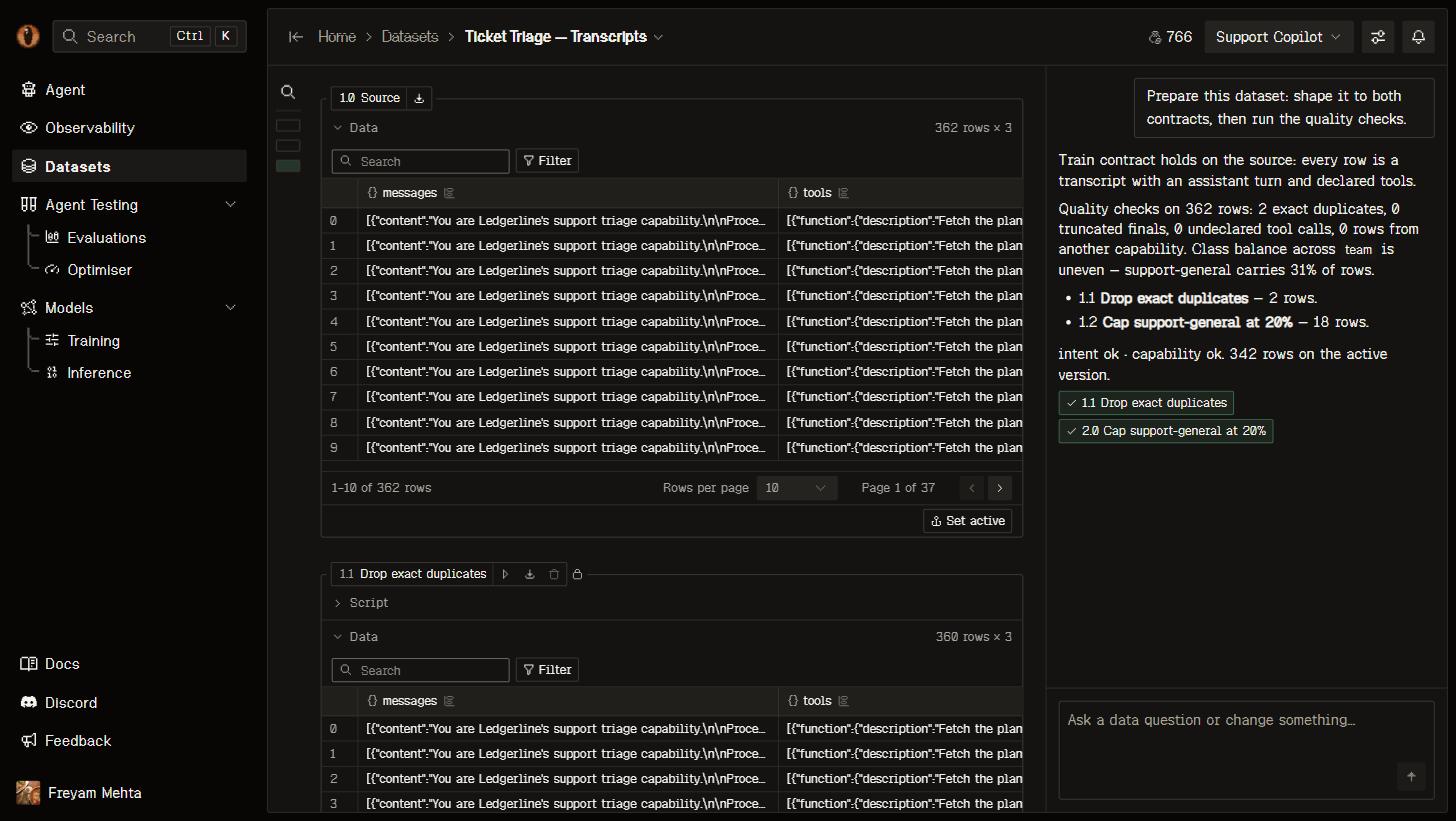 The agent goes first, before you type anything. It decides the intent if you left it open, lands the smallest set of steps that make your data fit, then runs the quality checks for that intent — duplicates, empty or truncated final turns, length outliers, tool calls that don't parse, missing or trivial references, the answer leaking into the input, rows from another capability — and adds one step per finding, with the row count in its note. A fix that would drop more than half your rows waits in the chat as a proposal with **Run** and **Discard** instead of landing on its own.
After that, ask for what you want in plain language. "Drop rows whose answer is under ten tokens." "Split each transcript per assistant turn." "Use this for training instead." Every request is one step, run immediately, and you see exactly which rows and values changed against the step before.
Each step is Python you can read and edit yourself: it reads the previous table as `df` and leaves the next one in `df`, with pandas, numpy, DuckDB, scikit-learn and the rest already available. Edit a step and everything after it re-runs. If a step fails, you get the traceback and your last good version stays in use.
## Versions
Every step that runs is a version — the source is 1.0, each step adds 1.1, 1.2, and so on. The version a run reads is the **active** one, which is the last one that ran unless you pick another.
The moment a run uses a version, that version is frozen: its rows can't change and neither can any step before it. So an eval run from last week still means what it meant, while you keep curating on top. Carry on and the next run picks up your new active version.
## Contracts
Overmind measures every version against what your intent actually needs, and tells you on the page whether it fits:
| Intent | Shape | Per row | Feeds |
| --------- | ------------------------------------------------------------------------------------------ | --------------------------------------------------------------------------------------------- | --------------------------------------------------------------------------------------- |
| **Train** | A `messages` column, every row a chat transcript with an assistant turn (`tools` optional) | The system turn is your capability's own prompt, and every tool call names a tool it declares | [Model training](/models/training) |
| **Eval** | An `input` on every row and an `expected_output` column with real references | Every `input` carries the keys your capability requires | [Eval runs](/agent-testing/eval), the [Optimiser](/agent-testing/optimisers), backtests |
When a version doesn't fit, the page offers only the moves that would change the verdict — fix it, use it for the other intent, switch capability. Each one is a single request to the agent.
Rows that can't meet a contract are counted with the reason, never quietly filled in with a default. And if your training data shares runs with your eval data, the training job drops the overlap and says so — the wizard shows you the count before you launch.
## From your coding agent
`/overmind dataset` covers the loop: land a dataset from traces, inspect it, query it with SQL, ask its agent for a change, accept a proposal. Files and exports go through the CLI, because bytes don't travel over MCP:
```bash theme={"dark"}
overmind dataset upload rows.jsonl --intent eval
overmind dataset export --format jsonl
```
See [MCP](/platform/mcp) and the [CLI](/platform/cli#overmind-dataset).
## Use it elsewhere
Export a version as JSONL or CSV from its title chip in the workshop, or over the API:
```bash theme={"dark"}
curl -H "X-Api-Key: $OVERMIND_API_KEY" \
"https://api.overmindlab.ai/api/datasets/{id}/export/?fmt=jsonl"
```
An export is a plain download and never counts as a use, so it won't freeze anything. Local loops — the optimiser and backtests — pull the exact version they were given and cache it under `.overmind/datasets/`.
Everything the workshop does is available over REST: create a dataset, add or edit a step, run the chain, message the agent, page through rows with their diff marks, and stream events as they happen. See [Building a dataset](/platform/api#building-a-dataset).
## Next steps
Measure variants against a baseline with the dataset you just built.
Fine-tune on your own traffic and benchmark it against what you ship today.
Let candidate code changes compete over the same rows.
More real runs in means better data to curate from.
The agent goes first, before you type anything. It decides the intent if you left it open, lands the smallest set of steps that make your data fit, then runs the quality checks for that intent — duplicates, empty or truncated final turns, length outliers, tool calls that don't parse, missing or trivial references, the answer leaking into the input, rows from another capability — and adds one step per finding, with the row count in its note. A fix that would drop more than half your rows waits in the chat as a proposal with **Run** and **Discard** instead of landing on its own.
After that, ask for what you want in plain language. "Drop rows whose answer is under ten tokens." "Split each transcript per assistant turn." "Use this for training instead." Every request is one step, run immediately, and you see exactly which rows and values changed against the step before.
Each step is Python you can read and edit yourself: it reads the previous table as `df` and leaves the next one in `df`, with pandas, numpy, DuckDB, scikit-learn and the rest already available. Edit a step and everything after it re-runs. If a step fails, you get the traceback and your last good version stays in use.
## Versions
Every step that runs is a version — the source is 1.0, each step adds 1.1, 1.2, and so on. The version a run reads is the **active** one, which is the last one that ran unless you pick another.
The moment a run uses a version, that version is frozen: its rows can't change and neither can any step before it. So an eval run from last week still means what it meant, while you keep curating on top. Carry on and the next run picks up your new active version.
## Contracts
Overmind measures every version against what your intent actually needs, and tells you on the page whether it fits:
| Intent | Shape | Per row | Feeds |
| --------- | ------------------------------------------------------------------------------------------ | --------------------------------------------------------------------------------------------- | --------------------------------------------------------------------------------------- |
| **Train** | A `messages` column, every row a chat transcript with an assistant turn (`tools` optional) | The system turn is your capability's own prompt, and every tool call names a tool it declares | [Model training](/models/training) |
| **Eval** | An `input` on every row and an `expected_output` column with real references | Every `input` carries the keys your capability requires | [Eval runs](/agent-testing/eval), the [Optimiser](/agent-testing/optimisers), backtests |
When a version doesn't fit, the page offers only the moves that would change the verdict — fix it, use it for the other intent, switch capability. Each one is a single request to the agent.
Rows that can't meet a contract are counted with the reason, never quietly filled in with a default. And if your training data shares runs with your eval data, the training job drops the overlap and says so — the wizard shows you the count before you launch.
## From your coding agent
`/overmind dataset` covers the loop: land a dataset from traces, inspect it, query it with SQL, ask its agent for a change, accept a proposal. Files and exports go through the CLI, because bytes don't travel over MCP:
```bash theme={"dark"}
overmind dataset upload rows.jsonl --intent eval
overmind dataset export --format jsonl
```
See [MCP](/platform/mcp) and the [CLI](/platform/cli#overmind-dataset).
## Use it elsewhere
Export a version as JSONL or CSV from its title chip in the workshop, or over the API:
```bash theme={"dark"}
curl -H "X-Api-Key: $OVERMIND_API_KEY" \
"https://api.overmindlab.ai/api/datasets/{id}/export/?fmt=jsonl"
```
An export is a plain download and never counts as a use, so it won't freeze anything. Local loops — the optimiser and backtests — pull the exact version they were given and cache it under `.overmind/datasets/`.
Everything the workshop does is available over REST: create a dataset, add or edit a step, run the chain, message the agent, page through rows with their diff marks, and stream events as they happen. See [Building a dataset](/platform/api#building-a-dataset).
## Next steps
Measure variants against a baseline with the dataset you just built.
Fine-tune on your own traffic and benchmark it against what you ship today.
Let candidate code changes compete over the same rows.
More real runs in means better data to curate from.