
How capabilities get into Overmind
The scan
Discovery runs in your repository, not on the server./overmind setup in your coding agent drives it; overmind chassis and overmind sync are the CLI halves. See the CLI.
The installed skill opens with the detected repository, package manager, and verified connection, then previews ten onboarding stages: installation, project connection, and eight scan stages. Each update shows the current stage name and number, completed count, and how many stages follow it. Discovery explains the capabilities and their source-grounded relationships; later updates report findings rather than just commands. Longer stages include per-capability counts. Completion requires a successful sync; a failed stage keeps its number and reports the error.
Before upload, the agent summarizes the destination, included data, credential checks performed, and local configuration to review. The final handoff reports what was actually synced, material caveats, outstanding verification, and one recommended next action. Instrumentation, application runs, and server-side evaluator preparation remain separate work.
Before scanning, the agent identifies its model when available, the configured Overmind destination, and the data involved. Source excerpts read by the coding agent enter its model context. Sync sends capability metadata, including captured prompt text, tool descriptions, and source references; it does not send a repository archive. The configuration’s API-key field is excluded from the snapshot and used for authentication. Overmind may pass the synced metadata to its configured providers to prepare evaluators. Local command execution is not a guarantee that all model processing stays on the machine.
1
overmind chassis
Prints a deterministic AST inventory of Python functions and call edges under the repository root.
/overmind setup runs this first; the digest is ground truth the cards must not contradict.2
Author the cards
The coding agent reads the source against that chassis and writes one capability per product purpose into
overmind.toml — name, slug, entry point, prompt, tools, and a card: task, input/output contract, success criteria, failure modes, and a trajectory map of anchors with file#Lstart-Lend provenance. Roles inside one orchestration — a crew, a graph of workers, a supervisor with specialists — are modes of the one capability that orchestration serves, not separate capabilities. There is no server-side model call.3
overmind sync
POSTs
overmind.toml to POST /api/v1/sync. The response carries assigned capability ids, and the CLI writes them back. The first sync with an account-scoped key creates the project and mints the project-scoped key the MCP entry uses./overmind setup again; it includes the final overmind sync. A trajectory entry whose anchors are not call-graph reachable from its entry is stamped verified = false.
What the server does with a sync
POST /api/v1/sync reconciles the snapshot with the project’s capabilities. Then, per capability:
- Identity is carried, in order: the toml
id→ the tomlslug→ a new record. A capability the push no longer includes becomes a leftover (archived = truein the toml on the nextsync down). - Behaviours are minted from the trajectory map: one contract per mapped route, with an entry anchor, the ordered anchors that follow it, and its tool set. Behaviours are what trace scoring binds production traffic to; the Console labels the column Task.
- The Default eval set is refreshed for every current capability on each sync: Tier-0 rule-based checks compiled from the card (deduplicated), Tier-1 generative LLM judges grounded in it (authored once per capability), and per-behaviour outcome and step judges for trace scoring. See Eval.
A scan never deletes
A capability the push no longer includes becomes a leftover: it keeps its id and data, leaves the agent view, shows a Not in latest scan badge, and remounts in place when a later push reproduces it.slug in overmind.toml is the server identity — rename a capability by editing name, never slug.
To remove a capability yourself, use Delete capability at the bottom of its page (DELETE /api/capabilities/{id}/). The record is soft-deleted: it leaves lists, scans and identity lookup, its traces, datasets and runs stay, and its inference alias stops serving. Because a deleted capability is invisible to later syncs, the next push of the same code mints a fresh record with a new id, and overmind sync writes that id to overmind.toml. Code that sets the old UUID as capability_id needs the new one; a slug keeps binding.
Telemetry
Spans carryingovermind.capability.id — set with init(capability_id=...) or a capability(..., id=) scope — bind to that capability. The value is the capability’s UUID or its toml slug; both resolve, and both are stable through renames. overmind.capability.name is a display label and never binds.
Ingest never creates a capability. An identity the project does not know leaves the span unbound: it is stored, browsable under Observability’s Unbound filter, and binds retroactively when a later push makes the identity resolvable. A capability created by hand (POST /api/capabilities/) carries an Observed badge, because no scan can retire it.
The agent page
Agent in the sidebar opens the product view: the capability grid, or the onboarding prompt while the project is still empty. Open a capability for its page. The Repository snapshot in the header names the repository, branch and last scan time behind the map. A scan that recorded no revision reads Revision unavailable; a project with no scan reads No repository scan.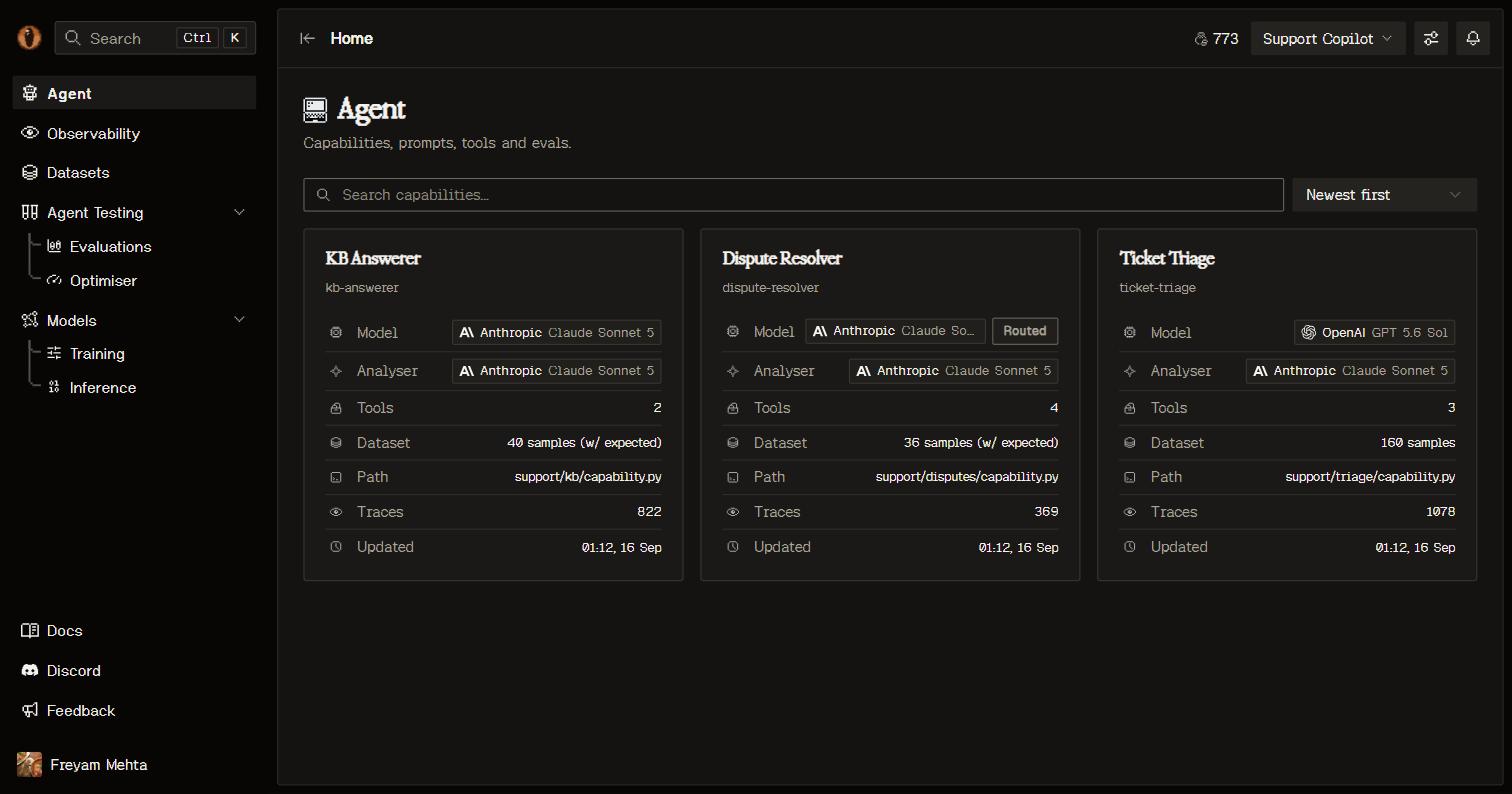
The Agent page: one card per capability with its model, traffic, and live score.
- Facts — the model the capability serves through (or the live deployed model behind its alias) and its source path.
- Prompt — the system prompt lifted from your code, one per mode when the capability has several.
- Trajectory map — the entry point, each behaviour’s steps with the tools they may use, and its terminal, as an interactive graph.
- Components — every anchor, tool and utility the scan found, with file-level provenance.
- Dataset — datasets aligned to this capability. See Datasets.
- Eval metrics — the capability’s eval sets and evaluators, with score history over its runs. See Eval.
- Models — the production model and any models trained on this capability’s data, linking into Models and Inference.
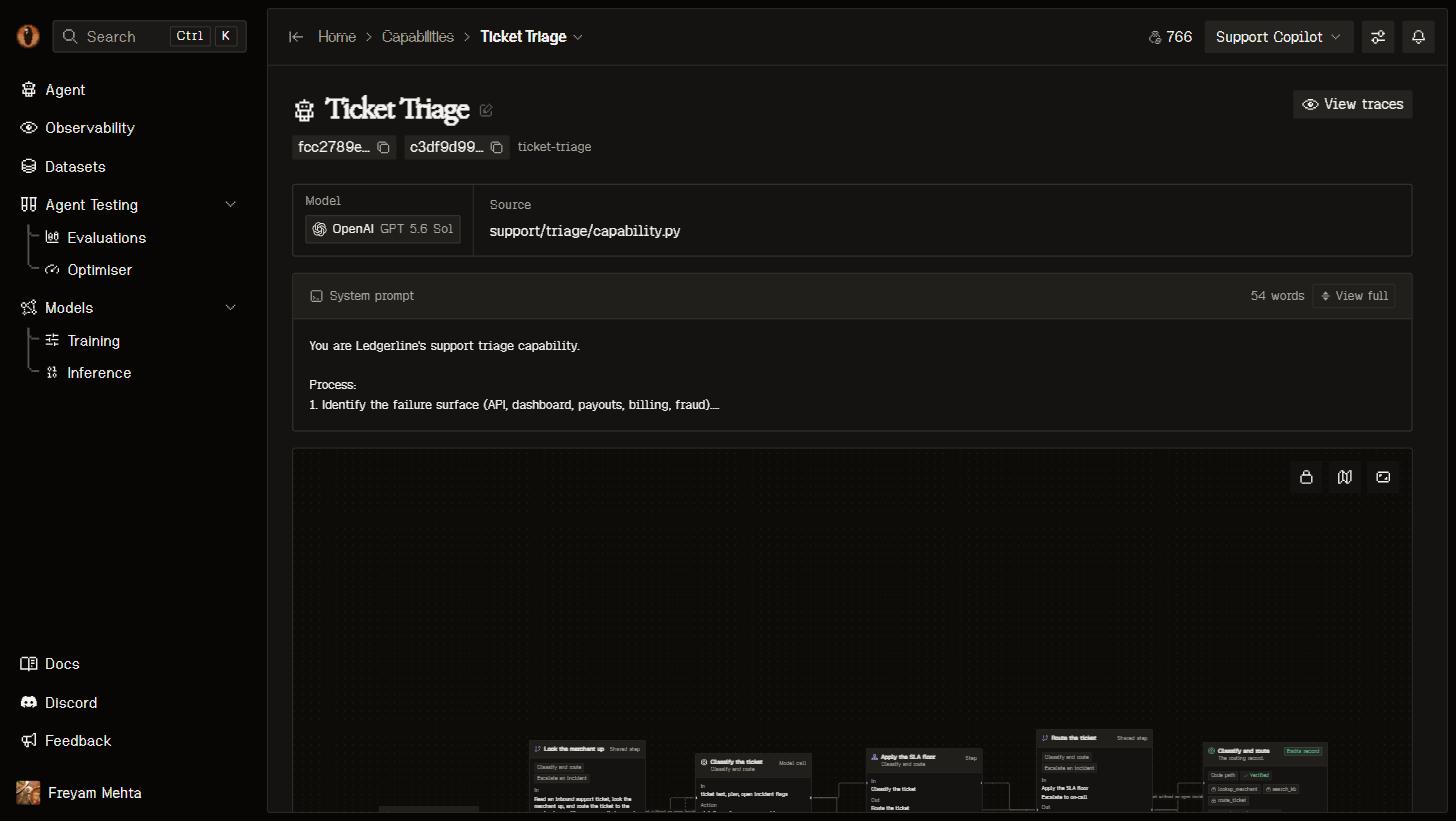
A capability page: facts, the prompt, and the trajectory map with two behaviours.
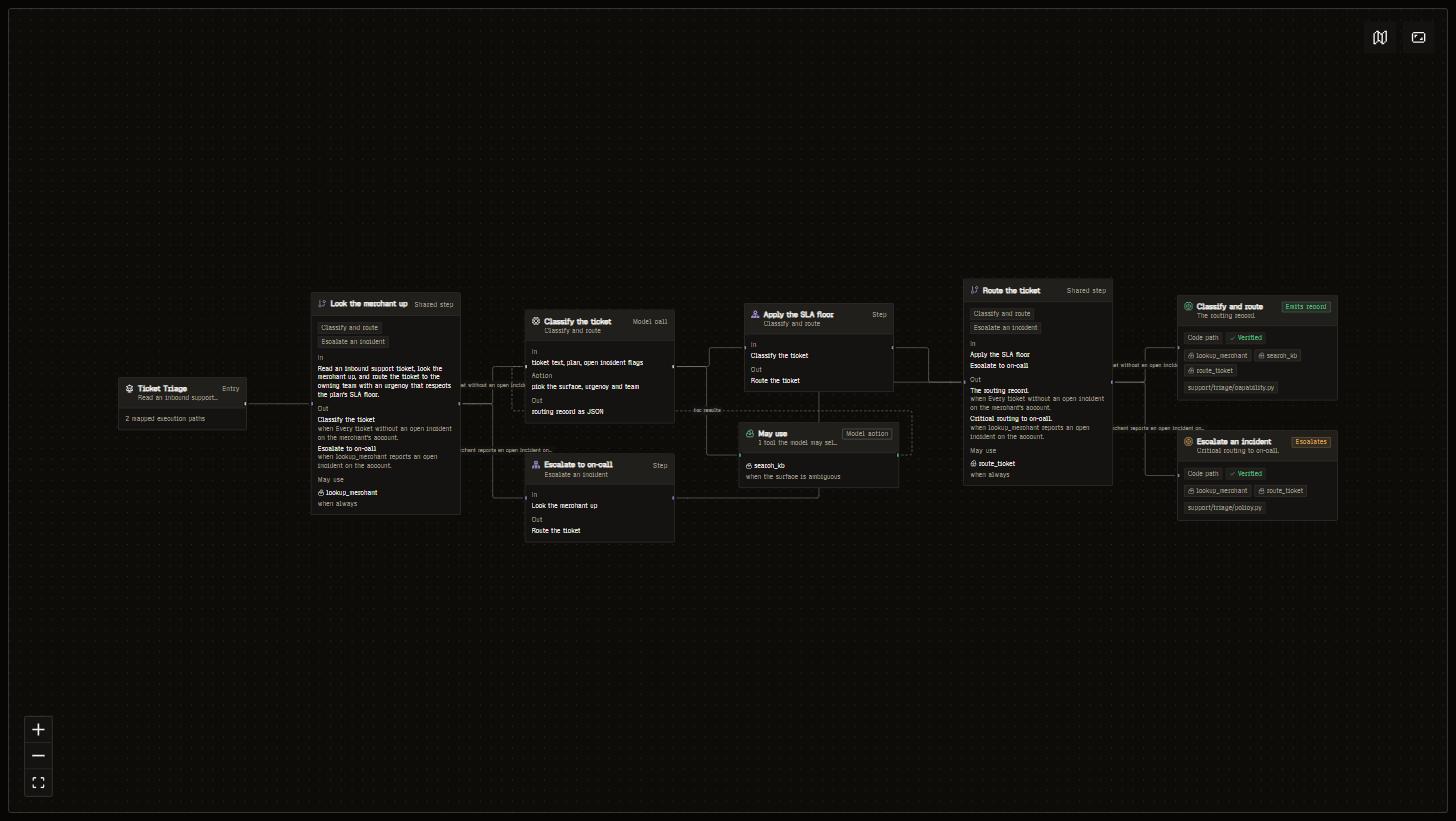
The trajectory map expanded: the entry point, each behaviour's steps and the tools they may use, and its terminal.
Instrumentation
Which of a capability’s anchors emit telemetry is answered by the traces themselves: a task execution’s route shows the contract anchors it matched, and a behaviour with no executions has none. To close a gap, ask your coding agent: theget_instrumentation_plan MCP tool returns placement tickets (file, qualname, decorator, required scope) for the project or one capability, and verify_instrumentation grades a fresh trace against the contract without writing anything. The /overmind ensure-tracing command runs that loop. See MCP.
API
GET /api/capabilities/ returns current capabilities unless ?status= asks for leftovers. PATCH /api/capabilities/{id}/ updates mutable fields, including model. Writing active_model starts a persisted activation that verifies inference before switching the alias; read activation for progress and errors. The existing selection remains active until verification succeeds. POST /api/v1/sync is what overmind sync speaks; it takes API-key auth and requires project_id to be in the key’s scope (a project-scoped key supplies its one project). Through MCP: inspect_capability_health, query_failures, and the overmind://capabilities/{capability} resource. See the REST API for the full surface.
Good to know
- The baseline matters. The capability’s
modelfield is what training benchmarks and optimiser baselines measure against. The card is where the model gets named when the codebase resolves models through a role chain rather than a literal. - Commit
overmind.toml. It carries the ids and the authored cards that keep identity and semantics stable across syncs..overmind/credentials.tomlholds the project key and is excluded from git byovermind sync. - Pin identity in code.
overmind.init(capability_id="<slug-or-uuid>")or acapability(..., id=)scope stampsovermind.capability.idon every span inside. Ingest binds by that id alone.