> ## Documentation Index
> Fetch the complete documentation index at: https://docs.overmindlab.ai/llms.txt
> Use this file to discover all available pages before exploring further.
# Agent & Capabilities
> How Overmind models your agent — one product graph per project, made of capabilities synced from your repo and confirmed by telemetry.
Your **agent** in Overmind is the product itself: one per project, mapped as a graph of **capabilities**. A capability is one purpose the product serves — triage tickets, answer from the knowledge base, resolve a dispute — the smallest unit you would name, ship, or fail. Each capability record joins two sides: static structure read from your repository (prompt, tools, control flow, entrypoint) and runtime behaviour from telemetry (traces, token usage, live scores). Everything else on the platform hangs off capabilities — traces are attributed to one, datasets can be bound to one, evaluators are scoped per capability, optimisation runs edit a capability's code, and trained models are benchmarked against the model a capability runs in production.
## How capabilities get into Overmind
```flow theme={"system"}
flow row
title: Two paths into the same capability record
A[Local repo | overmind.toml] -> C[Capability] : overmind sync
B[Production telemetry] -> C : overmind.capability.id
C -> E[Traces]
C -> F[Datasets]
C -> G[Eval sets]
C -> H[Optimisation runs]
C -> I[Trained models]
```
### Local discovery
Capability structure is discovered in your repository, not on the server. `overmind init` installs the skill; **`/overmind setup`** in your coding agent runs `overmind chassis` for the deterministic AST digest, maps the capabilities into `overmind_capabilities.json`, converts that to `overmind.toml`, and pushes the snapshot with **`overmind sync`**. Each sync POSTs the local graph to your project and writes reconciled capability ids back into the toml. The [CLI page](/platform/cli#overmind-sync) covers the commands.
Discovery reads your code deterministically — model-call sites, prompts, tools, product entrypoints, and the call graph between them — and uses that evidence to identify capabilities at the purpose level. Roles inside one orchestration (a crew, a graph of workers, a supervisor with specialists) are modes of the one capability that orchestration serves, not separate capabilities. The conversion step fills prompt spans, drops anchors the chassis cannot verify, and stamps each trajectory path `verified`.
The snapshot populates each capability's **card**: its task, input schema and expected output fields, the tool spec (each tool's purpose, arguments, side effect, and integration), the anchors into your code, the modes, and the trajectory map with its steps. The sync writes the card, the system prompt, and the eval matrix onto the record; the capability's description, tool summary, and decision logic are derived from the card. From the card the platform then preloads a starter set of [evaluators](/agent-testing/eval#authoring) — rule-based checks compiled from the output contract, then judges grounded in the card — which stay editable afterwards.
The sync also mints the capability's **tasks**: each named path through the trajectory map becomes a task with an entry anchor, the anchor segments that follow it, its tool set, and its terminal. Tasks are what [trace scoring](/agent-testing/trace-scoring#tasks-and-bindings) binds production traffic to, and what the Eval Library groups evaluators under. A later sync carries a task forward by its key first, then by its entry anchor when only one contract shares it, then by lineage; anything else is minted new.
After you change code or the toml, run `overmind sync` again to refresh structure on the platform.
### Sync keeps identity
A capability is reconciled by the `id` in the toml when it has one, else by its `slug`. A sync after a refactor carries the same record — same id, same name, same attached data — as long as the toml keeps the id, which `/overmind setup` preserves from the previous file. A capability the snapshot no longer includes becomes a **leftover**: it leaves the agent instead of being deleted, shows a **Not in latest scan** badge, and comes back in place if a later sync reproduces it; `archived = true` in the toml keeps it a leftover on purpose. A capability minted from telemetry alone is marked **Observed** and never retired by a scan.
To remove a capability yourself, use **Delete capability** at the bottom of its page. The capability leaves the agent; its traces, datasets, and runs stay in place. A deleted capability is invisible to later syncs, so if the code still has it, the next sync creates a fresh record.
### Telemetry
When spans arrive carrying `overmind.capability.id` — set via [`init(capability_id=...)`](/tracing/sdk-python#init) or a `capability(..., id=)` scope — Overmind attaches them to that capability. The id is stable through renames; the name attribute is a display label and never binds.
An identity the project does not know leaves the span **unbound** rather than minting a phantom capability. Unbound traces are stored and browsable under Observability's Unbound filter, and they bind retroactively: when a sync or a manual create later makes that identity resolvable, the backlog re-attaches on its own.
## The agent page
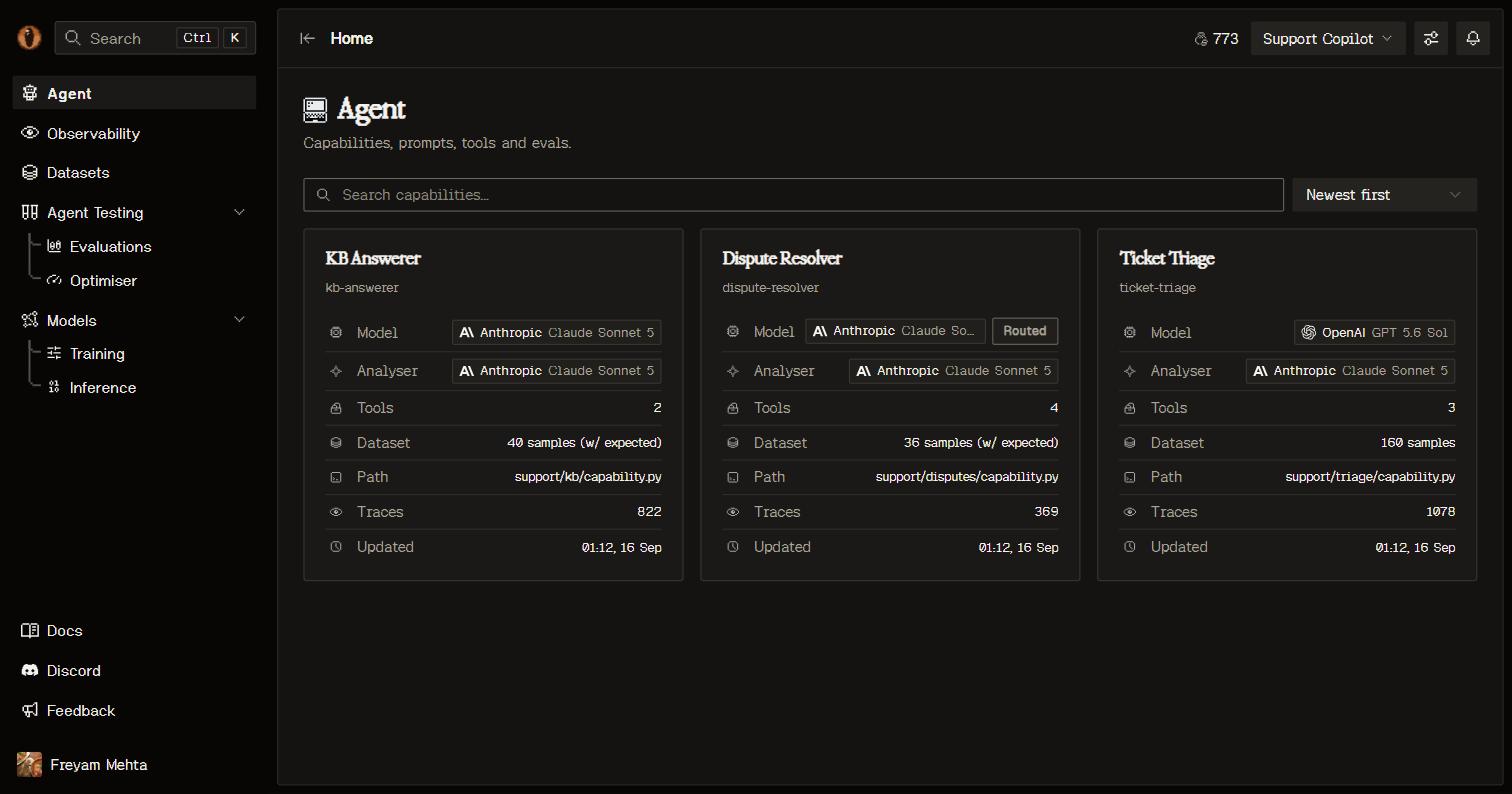
**Agent** in the sidebar opens the product view: the capability grid, or the onboarding prompt while the project is still empty. Open a capability for its page.
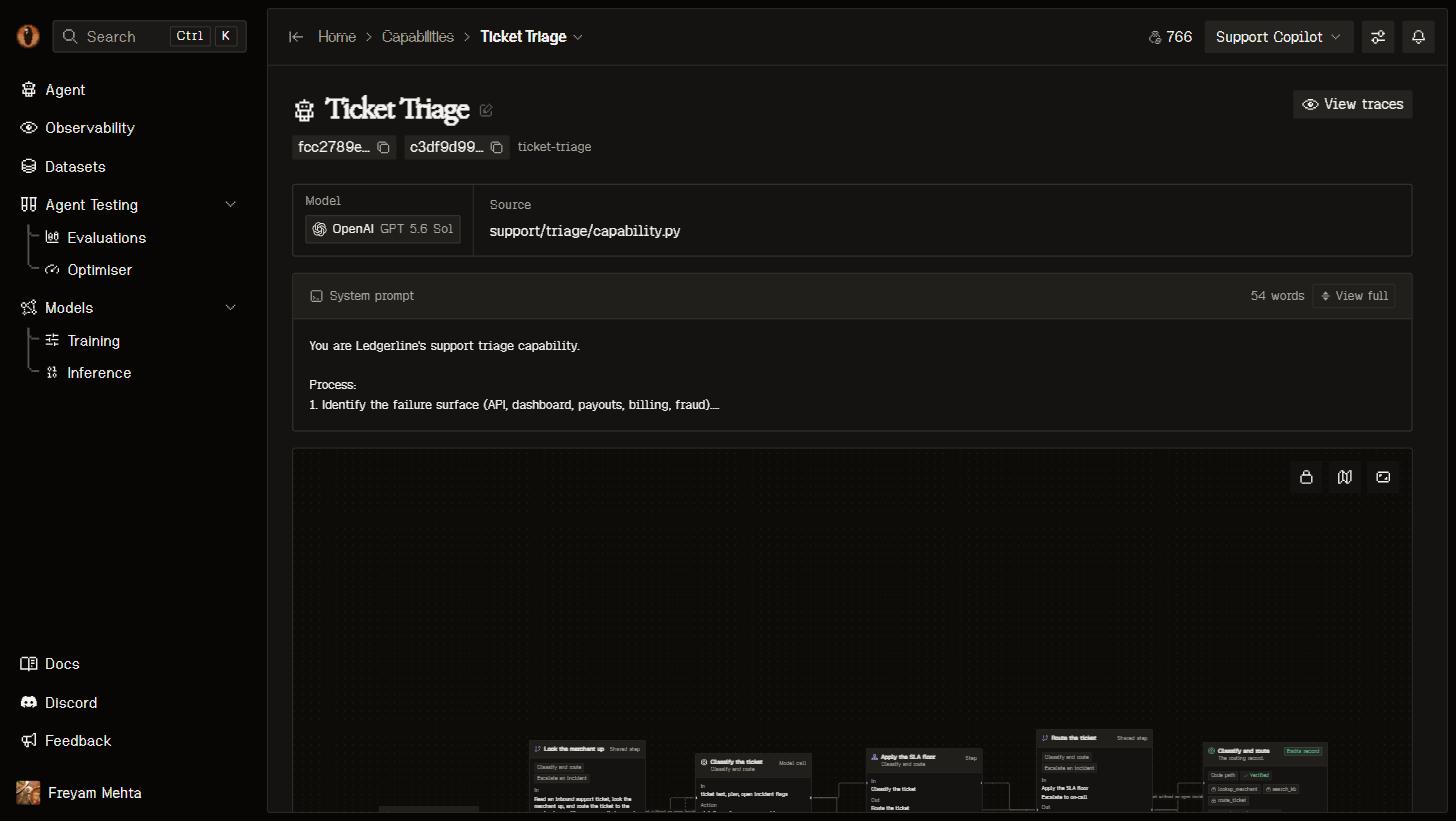
 The header carries the name (editable in place), copyable **capability id** and **project id** chips (you'll need the capability id for trace attribution), the slug, and a **View traces** shortcut into its filtered Observability view. Below it, one scrolling page:
* **Facts** — the model the capability serves through (or the deployed model behind its alias) and its source path.
* **Prompt** — the system prompt lifted from your code, plus one prompt per mode when the capability has several.
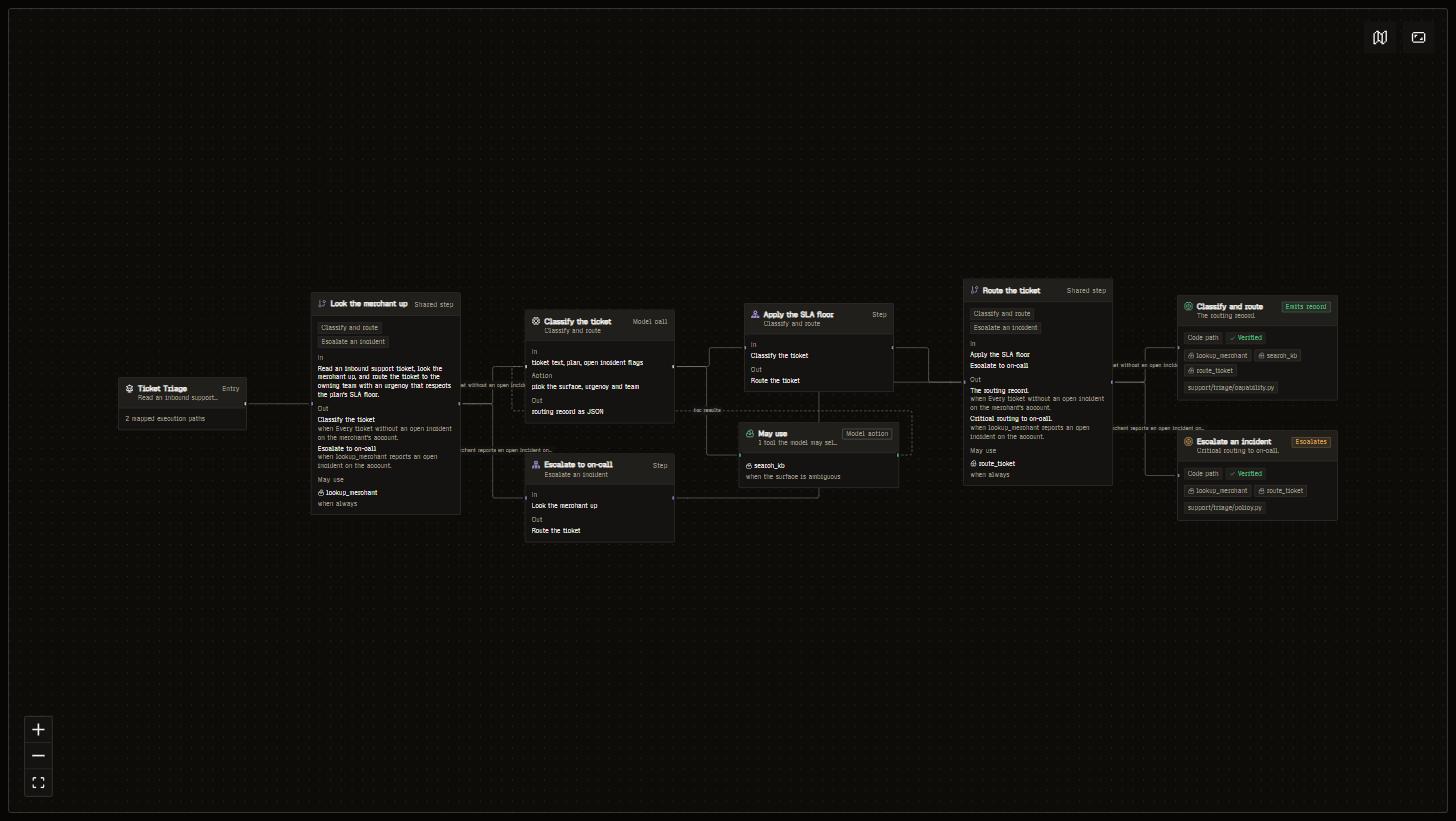
* **Trajectory map** — the entry point, each task's steps with the tools they may use, decision surfaces, and terminals, laid out as an interactive graph.
* **Components** — every anchor, tool, and utility the scan found, with file-level provenance. This is the fastest way to check that Overmind read your code correctly.
* **Dataset** — datasets attached to this capability, built from its traces or uploaded. See [Datasets](/core/datasets).
* **Eval metrics** — the capability's evaluators and eval sets, with score history over its runs. See [Eval](/agent-testing/eval).
* **Models** — the production baseline and any models trained on this capability's data, linking into [Training](/models/training) and [Inference](/models/inference).
The header carries the name (editable in place), copyable **capability id** and **project id** chips (you'll need the capability id for trace attribution), the slug, and a **View traces** shortcut into its filtered Observability view. Below it, one scrolling page:
* **Facts** — the model the capability serves through (or the deployed model behind its alias) and its source path.
* **Prompt** — the system prompt lifted from your code, plus one prompt per mode when the capability has several.
* **Trajectory map** — the entry point, each task's steps with the tools they may use, decision surfaces, and terminals, laid out as an interactive graph.
* **Components** — every anchor, tool, and utility the scan found, with file-level provenance. This is the fastest way to check that Overmind read your code correctly.
* **Dataset** — datasets attached to this capability, built from its traces or uploaded. See [Datasets](/core/datasets).
* **Eval metrics** — the capability's evaluators and eval sets, with score history over its runs. See [Eval](/agent-testing/eval).
* **Models** — the production baseline and any models trained on this capability's data, linking into [Training](/models/training) and [Inference](/models/inference).
 ## Instrumentation
Which of a capability's anchors emit telemetry is answered by the traces themselves: an execution's route shows the contract anchors it matched, and a task with no executions has none. To close a gap, ask your coding agent — the `get_instrumentation_plan` MCP tool returns exact placement tickets (file, line, decorator, required scope) for a capability or one of its tasks, and `verify_instrumentation` grades a fresh trace against the contract before anything is scored. The `/overmind ensure-tracing` command runs that loop end to end. See [MCP](/platform/mcp).
## API
```bash theme={"system"}
# The whole agent graph: current capabilities and their edges
curl -H "X-Api-Key: $OVERMIND_API_KEY" "https://api.overmindlab.ai/api/agent/?project={project_id}"
# List capabilities / one capability
curl -H "X-Api-Key: $OVERMIND_API_KEY" "https://api.overmindlab.ai/api/capabilities/"
curl -H "X-Api-Key: $OVERMIND_API_KEY" "https://api.overmindlab.ai/api/capabilities/{id}/"
# The machine-readable evaluation spec and the prompts the flow derives
curl -H "X-Api-Key: $OVERMIND_API_KEY" "https://api.overmindlab.ai/api/capabilities/{id}/eval_spec/"
curl -H "X-Api-Key: $OVERMIND_API_KEY" "https://api.overmindlab.ai/api/capabilities/{id}/prompts/"
# The capability's tasks and how well the eval set covers each one
curl -H "X-Api-Key: $OVERMIND_API_KEY" "https://api.overmindlab.ai/api/behaviours/"
curl -H "X-Api-Key: $OVERMIND_API_KEY" "https://api.overmindlab.ai/api/behaviours/coverage/?capability={id}"
# The toml round-trip overmind sync uses
curl -H "X-Api-Key: $OVERMIND_API_KEY" "https://api.overmindlab.ai/api/v1/sync?project_id={project_id}"
```
`PATCH /api/capabilities/{id}/` updates mutable fields, including `model` and `active_model`. `DELETE /api/capabilities/{id}/` hides the capability: it leaves lists, syncs, and identity lookup, and its data stays. `GET /api/v1/sync` returns the project's snapshot with leftovers marked `archived`. Through MCP: `inspect_capability_health`, `query_failures`, and the `overmind://capabilities/{capability}` resource. See the [REST API](/platform/api) overview for the full surface.
## Good to know
* **The baseline matters.** The capability's `model` field is what training benchmarks and optimiser baselines measure against — keep it accurate. When a deployed model is made live, `active_model` takes over behind the `overmind/` inference alias.
* **Delete hides, it doesn't destroy.** Traces, datasets, and runs underneath a deleted capability remain intact. Its inference alias stops serving.
* **Keep the toml in the repo.** `overmind.toml` carries the ids that keep identity stable across syncs; `.overmind/credentials.toml` next to it holds the key and stays ignored.
## Instrumentation
Which of a capability's anchors emit telemetry is answered by the traces themselves: an execution's route shows the contract anchors it matched, and a task with no executions has none. To close a gap, ask your coding agent — the `get_instrumentation_plan` MCP tool returns exact placement tickets (file, line, decorator, required scope) for a capability or one of its tasks, and `verify_instrumentation` grades a fresh trace against the contract before anything is scored. The `/overmind ensure-tracing` command runs that loop end to end. See [MCP](/platform/mcp).
## API
```bash theme={"system"}
# The whole agent graph: current capabilities and their edges
curl -H "X-Api-Key: $OVERMIND_API_KEY" "https://api.overmindlab.ai/api/agent/?project={project_id}"
# List capabilities / one capability
curl -H "X-Api-Key: $OVERMIND_API_KEY" "https://api.overmindlab.ai/api/capabilities/"
curl -H "X-Api-Key: $OVERMIND_API_KEY" "https://api.overmindlab.ai/api/capabilities/{id}/"
# The machine-readable evaluation spec and the prompts the flow derives
curl -H "X-Api-Key: $OVERMIND_API_KEY" "https://api.overmindlab.ai/api/capabilities/{id}/eval_spec/"
curl -H "X-Api-Key: $OVERMIND_API_KEY" "https://api.overmindlab.ai/api/capabilities/{id}/prompts/"
# The capability's tasks and how well the eval set covers each one
curl -H "X-Api-Key: $OVERMIND_API_KEY" "https://api.overmindlab.ai/api/behaviours/"
curl -H "X-Api-Key: $OVERMIND_API_KEY" "https://api.overmindlab.ai/api/behaviours/coverage/?capability={id}"
# The toml round-trip overmind sync uses
curl -H "X-Api-Key: $OVERMIND_API_KEY" "https://api.overmindlab.ai/api/v1/sync?project_id={project_id}"
```
`PATCH /api/capabilities/{id}/` updates mutable fields, including `model` and `active_model`. `DELETE /api/capabilities/{id}/` hides the capability: it leaves lists, syncs, and identity lookup, and its data stays. `GET /api/v1/sync` returns the project's snapshot with leftovers marked `archived`. Through MCP: `inspect_capability_health`, `query_failures`, and the `overmind://capabilities/{capability}` resource. See the [REST API](/platform/api) overview for the full surface.
## Good to know
* **The baseline matters.** The capability's `model` field is what training benchmarks and optimiser baselines measure against — keep it accurate. When a deployed model is made live, `active_model` takes over behind the `overmind/` inference alias.
* **Delete hides, it doesn't destroy.** Traces, datasets, and runs underneath a deleted capability remain intact. Its inference alias stops serving.
* **Keep the toml in the repo.** `overmind.toml` carries the ids that keep identity stable across syncs; `.overmind/credentials.toml` next to it holds the key and stays ignored.